


This newsletter is sponsored by Influ2
Free: The ABM That Starts With People Report
Most ABM targets accounts. But accounts don’t buy, people do. This Influ2 report breaks down how to build ABM around the decision-makers who actually influence the deal.
Most teams research accounts without a system.
They open a list, tab through LinkedIn and the careers page, copy a few facts into a doc, then start typing the email. Twenty reps means twenty different processes, and nothing a manager can coach against.
I run the same two steps on every account, with one framework underneath. Here’s how it works.
5 mistakes I see with account research
Mistake #1: no research step at all.
Most reps go straight from a list to a sequence. Skip Miller calls this out in Outbounding (my full breakdown here): research is part of the process, not optional. You don’t skip it any more than you skip writing the email.
Mistake #2: only researching the contact.
“Find 3 things to personalize.” Most contacts aren’t active online. Even when they are, none of it connects to why their company might need your solution.
Company data is always there. News, hiring patterns, funding, tech stack, leadership changes, team structure.
Research the company first. People second.
Mistake #3: no framework, no documented process.
If you’re running 20 SDRs, each one researches differently right now. Nothing to coach against. Nothing to QA. No standard for onboarding new reps.
You can’t improve what you can’t see.
Mistake #4: doing all of this manually in 2026.
AI pulls funding rounds, leadership changes, hiring patterns, and press coverage in seconds. If your reps are still tabbing through LinkedIn, Crunchbase, and the careers page by hand, you’re paying SDR salaries for work an AI does in 1-2 min.
Mistake #5: running prompts in chat instead of building a workflow.
One-off ChatGPT prompts don’t scale. Every rep writes their own version, outputs land in random docs, nothing is reusable. A workflow runs the same prompt the same way every time, lands the output in the same place, and lets the next rep inherit the system instead of rebuilding it.
These mistakes stack up when you scale. One rep wastes their own time. Twenty reps waste pipeline. And you can’t coach against twenty-five different research methods, so quality stays uneven and ramp takes longer than it should.
The Account Research System
The Account Research System sits between two things you’ve already done: defined your ICP and selected your target accounts. It comes before “what to say.”
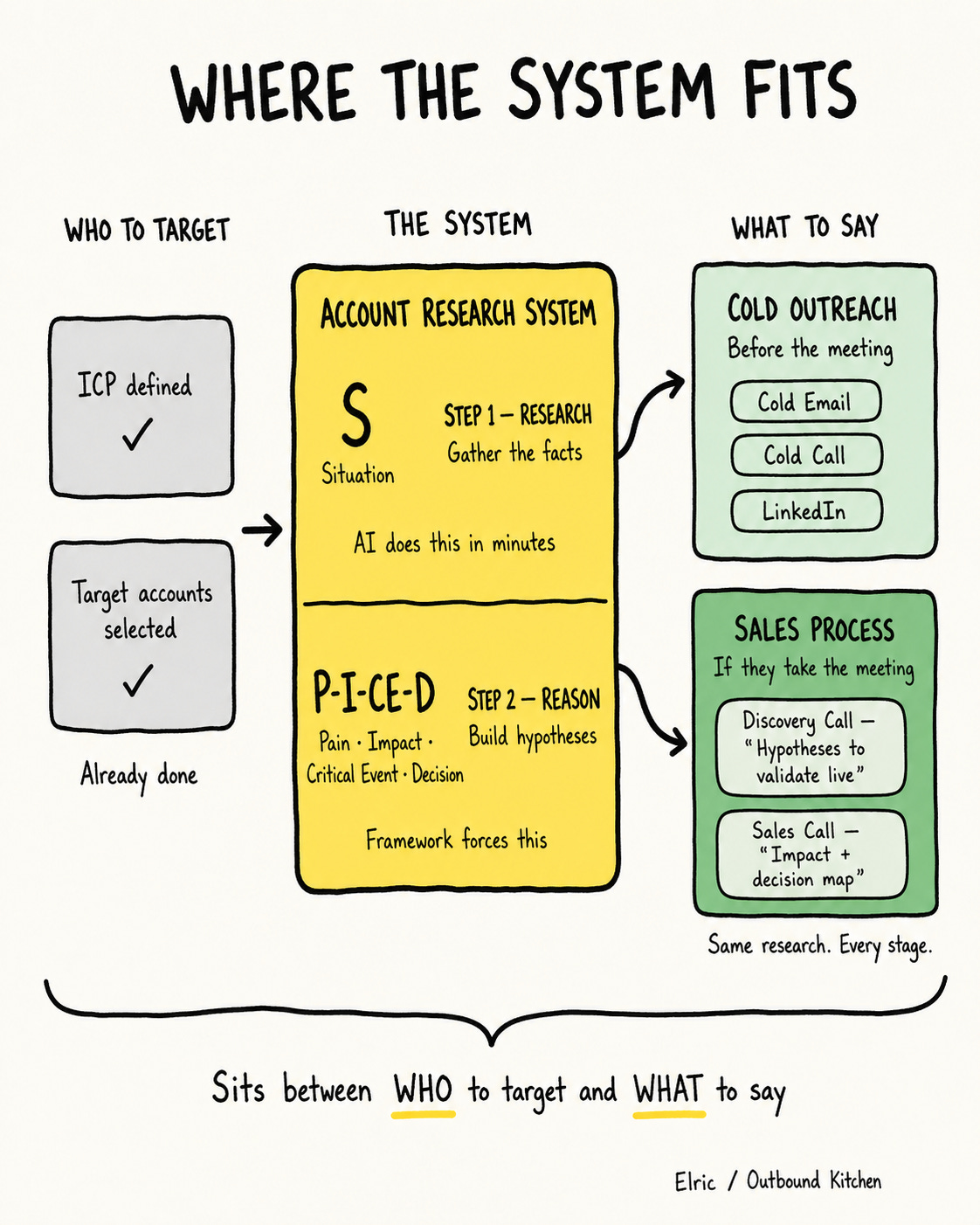
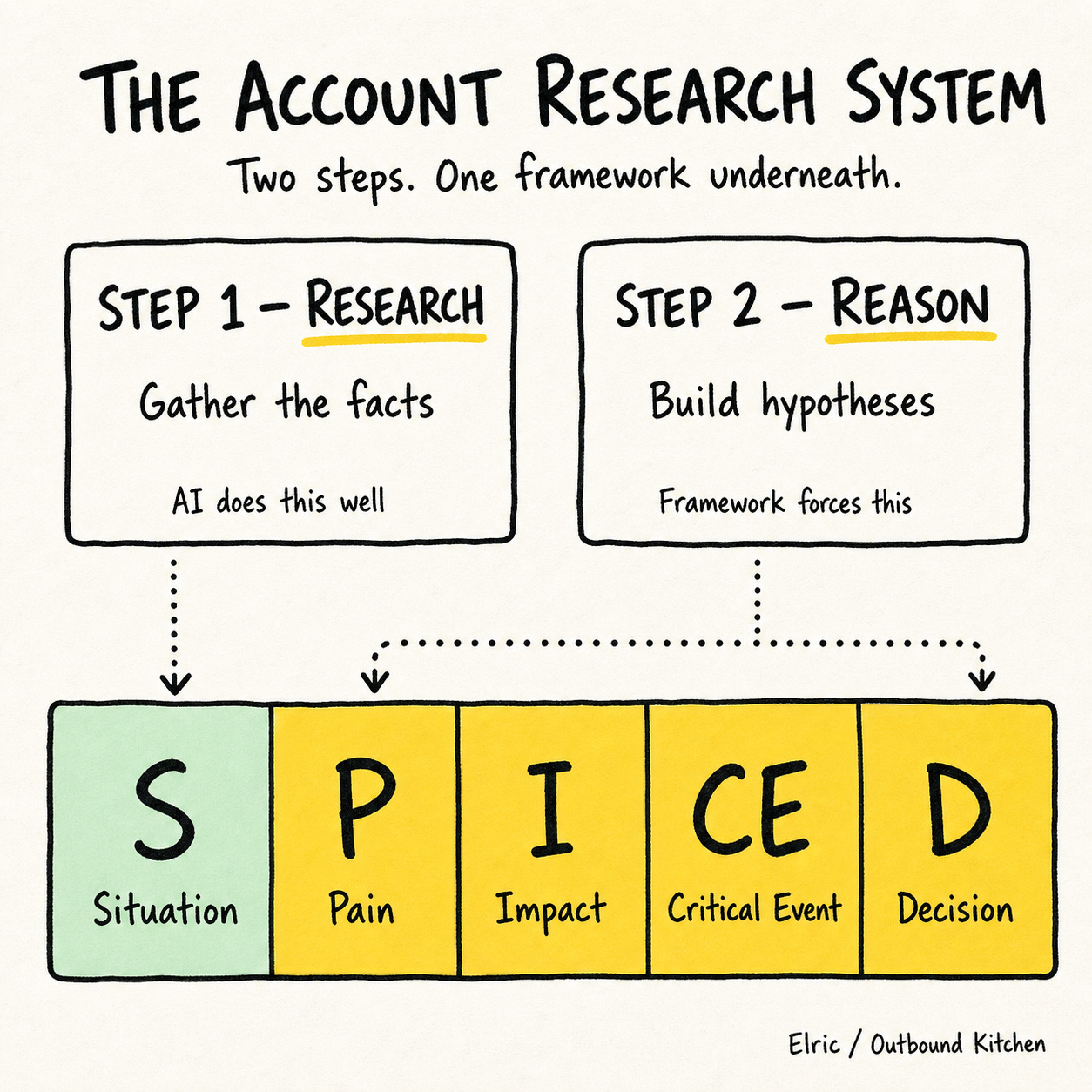
Two steps:
Step 1: Research. Gather the facts.
Step 2: Reason. Turn facts into hypotheses.
One framework underneath both: SPICED.
One output that feeds every channel: cold email, cold calls, LinkedIn, and the discovery call if they take the meeting.
Why SPICED?
I picked SPICED (by Winning by Design) because it’s buyer-centric. Situation, Pain, Impact, Critical Event, Decision. Every letter is about the prospect’s business, not the rep’s process.
Compare that to BANT: Budget, Authority, Need, Timeline. BANT is rep-centric. It’s the rep’s qualification checklist. You can’t pre-research any of it. Budget and timeline only come up once you’re already talking. BANT works for inbound calls where the prospect raised their hand. It doesn’t work for outbound, where you have to earn the meeting first.
SPICED is different. Most of it can be reasoned from what’s already public.
What’s online: funding rounds, leadership changes, hiring patterns, tech stack, GTM motion, press, customer logos. That’s enough to build the Situation and infer the Critical Event.
What’s not online: which pain is highest priority right now, what it’s actually costing them, who internally owns the decision. That’s the gap. You close it by stacking the public facts into a hypothesis, then testing the hypothesis on the call.
That’s the whole reason this works before the meeting is booked. SPICED forces you to reason about the buyer’s business, and most of the inputs are already sitting in public sources.
That public/not-public divide gives you a natural two-step split:
Step 1 = S (Situation). Pure facts.
Step 2 = P-I-CE-D. Reasoning on top of those facts.
Step 1 is what AI does well. Step 2 is what the framework forces AI to do that it wouldn’t do on its own.
Step 1. Research: the S in SPICED
To make it simple, let's focus on a net-new account. No prior conversations. No CRM notes. Just what you can find online.
Pure fact-gathering. The job here is data. Save the interpretation for Step 2.
Employee count and growth trajectory
Tech stack: CRM, sales tools, marketing automation
Funding stage and recent rounds
Leadership changes: new CRO, CMO, VP Sales
Hiring patterns: 5 AE openings, 0 SDR postings
GTM motion: PLG, sales-led, or channel
Customer base and market positioning
Account mapping: who’s on the team, their backgrounds, what tools they’ve used before. If there’s a CRO and 2 reps, the CRO is your go-to person. (First part of D, Decision in SPICED.)
One caveat. Not all of this data lives in the same place.
Some is easy to find with AI: funding rounds, job postings, leadership changes, press coverage. An AI model pulls that in seconds.
Other data isn’t available via web search. Headcount growth over the past 12 months. Sales team size compared to 24 months ago. For that, you need enrichment tools: Clay for headcount and team changes over time, BuiltWith for tech stack.
This is the input for every step after this, including who to contact.
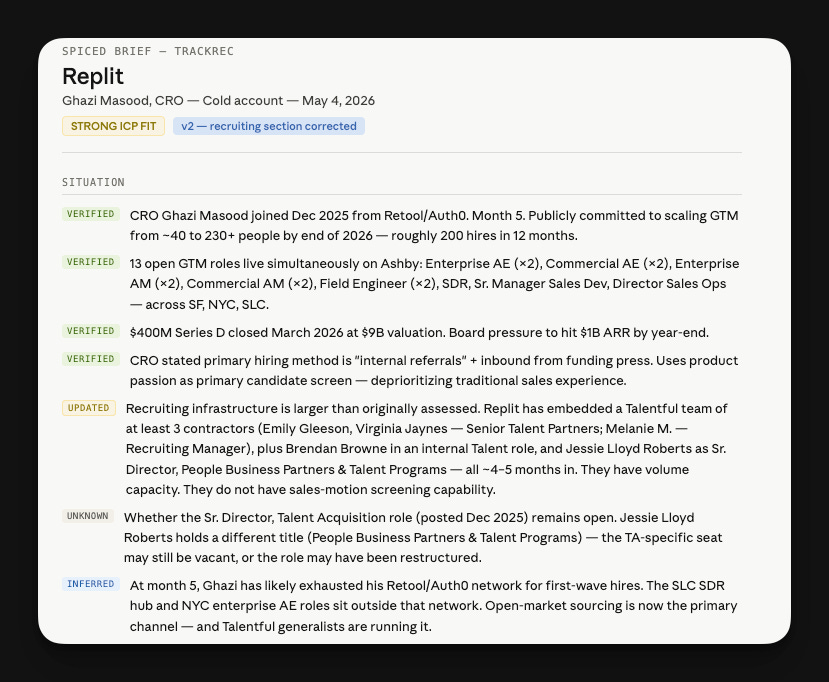
Example: Replit researched through TrackRec’s lens
If you’ve been reading the past few newsletters, you’ve seen me return to TrackRec → Replit. TrackRec, a company that helps organizations hire sales talent.
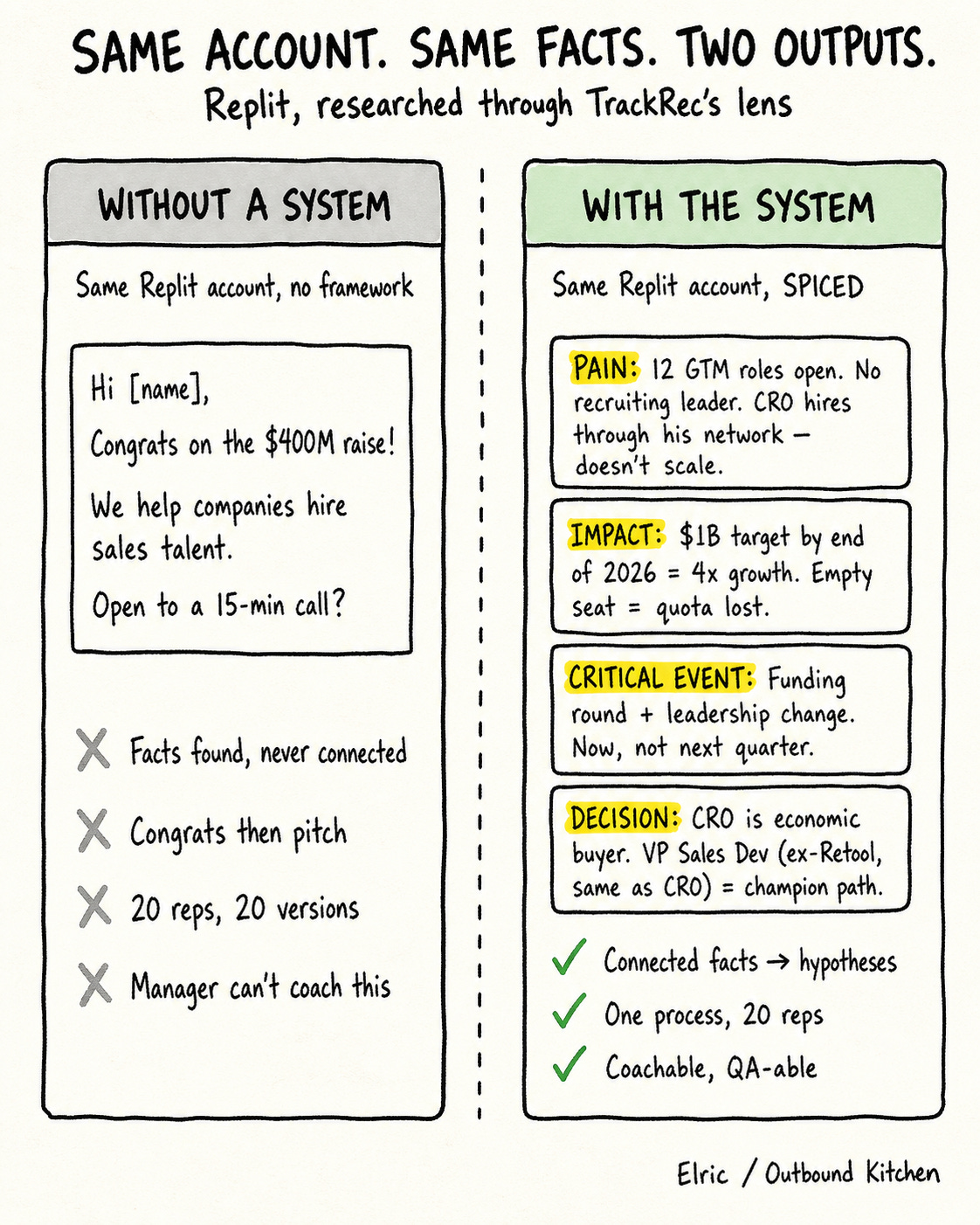
Without a system, a rep finds: Replit raised $400M, they’re hiring 12 roles. They send:
“Congrats on the raise! We help companies hire sales talent. Open to a 15-min call?”
Congrats, then pitch. No connection between the two. The rep found the facts but never connected them.
Here’s what the Account Research System produced instead.
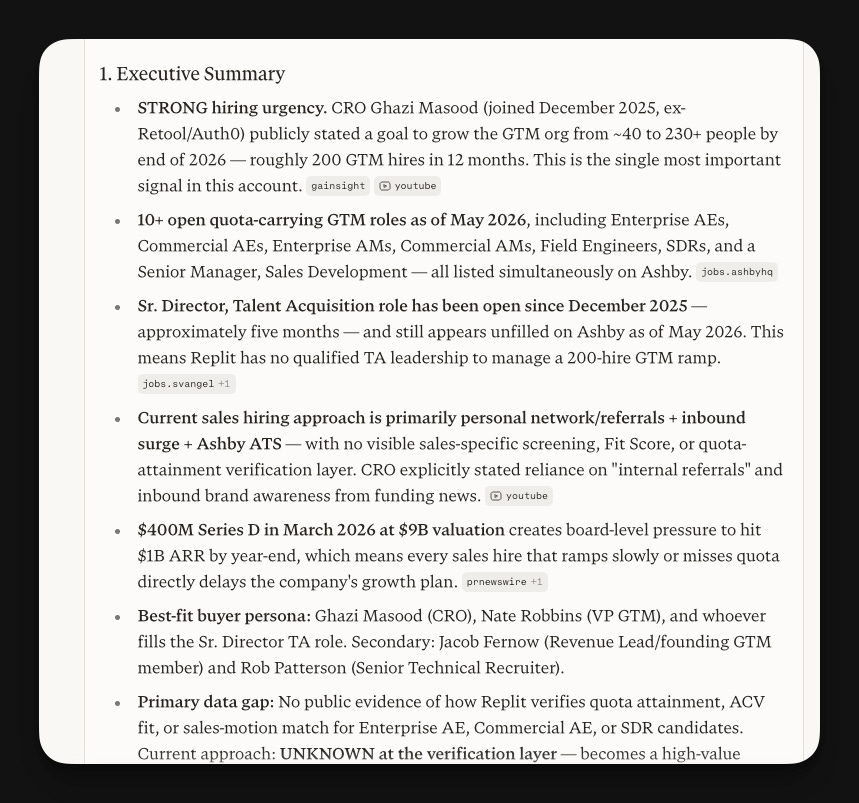
Target account: Replit. Researched through the lens of TrackRec, a company that helps organizations hire sales talent.
Perplexity output for this step:
Step 2. Reason: the P-I-CE-D in SPICED
Step 1 gave you the Situation. The facts.
Step 2 is where you reason through them using the rest of SPICED: Pain, Impact, Critical Event, Decision.
A pile of facts without a framework leaves you guessing. SPICED organizes those facts into hypotheses about why this company might need you.
This is the move I call layering flavors.
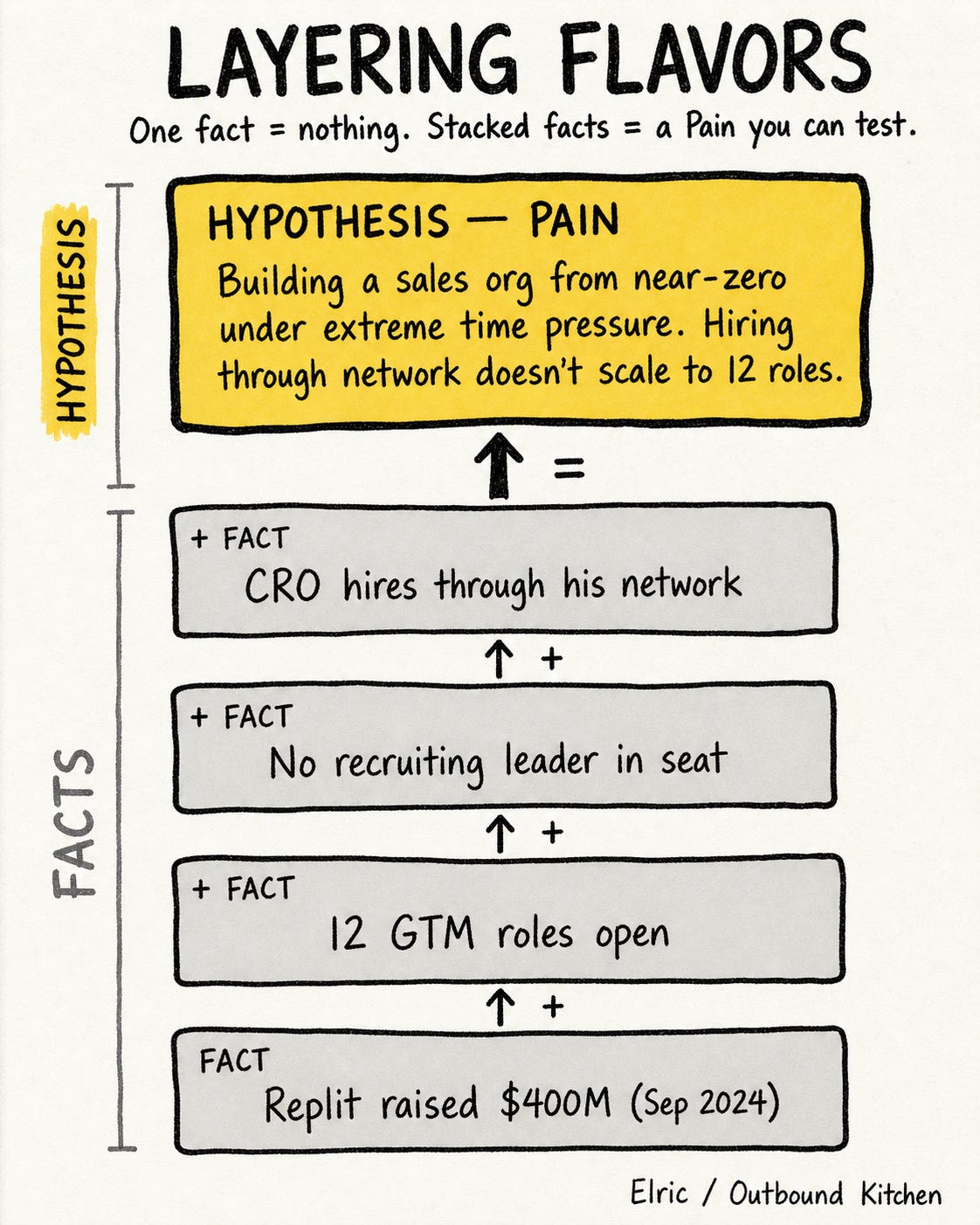
Step 1 gives you the raw ingredients. Step 2 stacks them so each one changes the meaning of the next. A funding round alone is just a fact. A funding round plus 12 open roles plus a new CRO plus no recruiting leader is a different dish entirely.
Now they’re hypotheses.
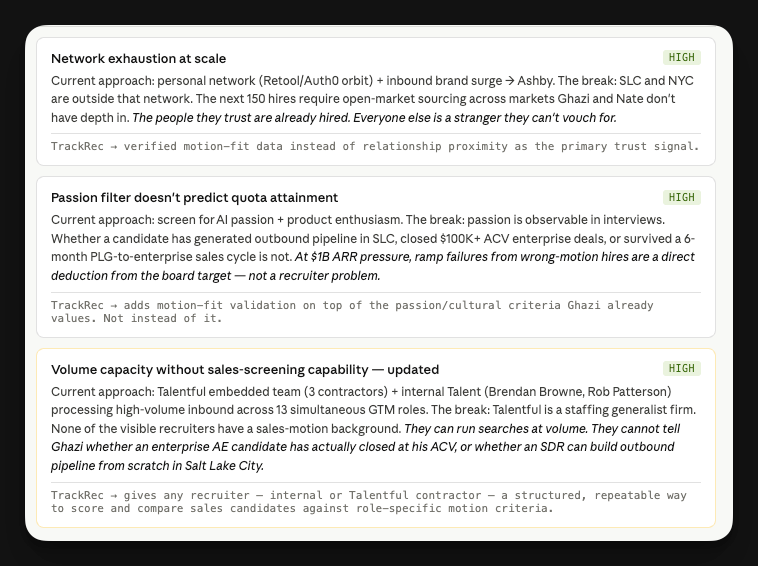
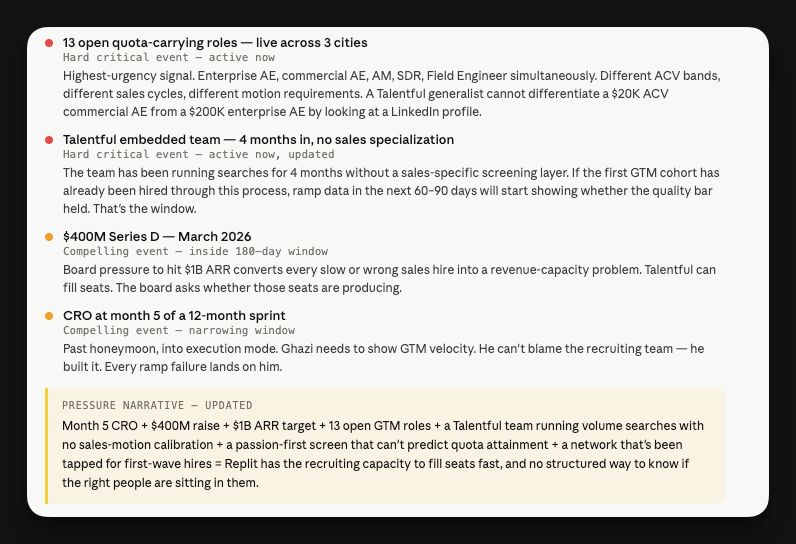
Pain.
Look for facts that imply a constraint: roles that stay open, leaders who scale through methods that don’t scale at the next stage, capacity missing where growth requires it. The pain isn’t in any single fact. It’s in how the facts together describe the bottleneck.
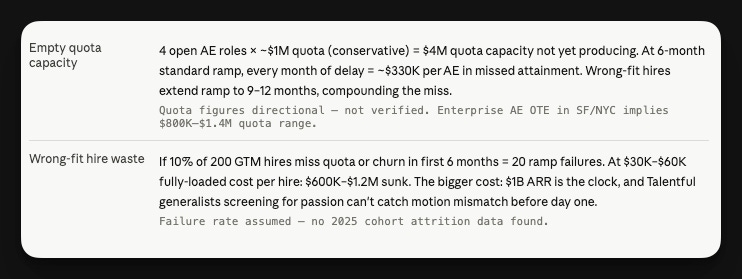
Impact.
The framework asks: what does this constraint cost them, and on what clock? Revenue at risk per month. Hiring milestones missed against a board commitment. Time burned during a leader’s first 90 days. Impact is always a number times a time horizon.
Example for Replit:
Critical Event (identified from Situation).
Leadership changes are critical events. Funding rounds are critical events. Multiple openings going up at once is a critical event. These create the time pressure that makes “later” stop being an option for the buyer.
Example for Replit:
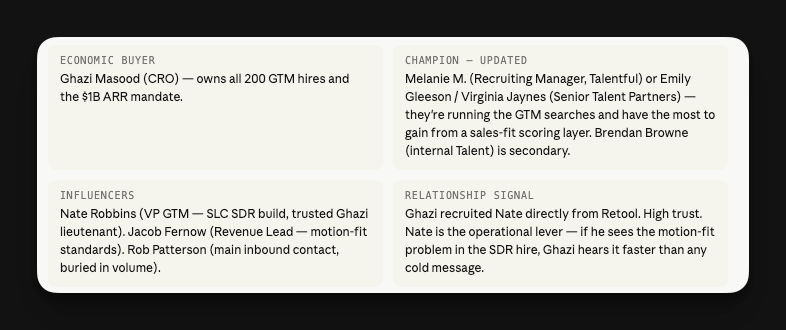
Decision (hypothesized from the org map).
You already mapped the account in Step 1. Now you reason through it.
Who’s the economic buyer? Who would feel the pain most? Look at a leader’s first hires. Anyone they brought in from a company that uses your product, or a competitor’s, is a champion hypothesis.
Company size gives you process clues. 50 employees means the CEO is in every deal. 500 means department heads. 2,000 means procurement.
Example for Replit:
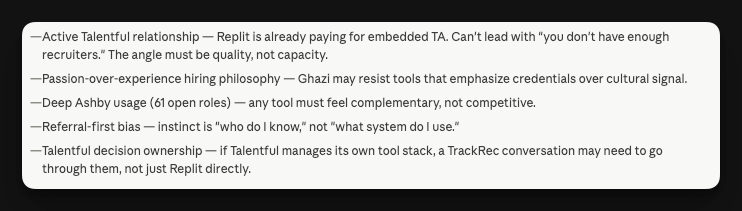
Blockers:
Two steps. Four connected hypotheses on top of the Situation.
Outreach Angles
From this research, three angles surface: the hiring-philosophy angle (passion vs. motion at 200 hires), the recruiting-capability angle (the gap, without attacking the team they’ve built), and the geography + ramp angle (SLC SDRs and NYC enterprise AEs running simultaneously). Each one opens a different conversation. None of them lead with “congrats on the raise.”
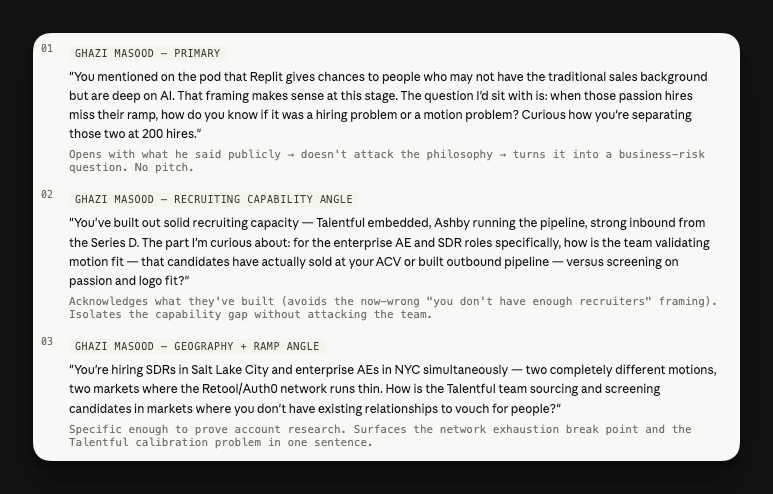
You can use this info on the phone, in a cold email, or on LinkedIn. And for your discovery calls when you book the first meeting.
That’s the Account Research System. If you want to start using it, try with 10 accounts to control the outputs, then scale with Clay, n8n, or any other orchestration tool.
Hope this is helpful.
Talk soon,
Elric
P.S. If you need help setting this up in your outbound systems, let me know.
For Paid Members - Your Account Research System
Paid members get the complete system: 3 prompts that personalizes this entire framework to YOUR company.
You can use this inside your orchestration app (Clay, Claude Code, etc).
The Prompts:
Prompt 1: Company Context Builder. Give it your website, ICP, conversations with customers, or G2 page. It builds your company context: ICP, value props, how buyers solve this today, critical events that create urgency. This is the lens for everything else.
Prompt 2: Account Research Generator. Paste your company context. It generates a customized research prompt with your competitors, buyer titles, and signals hardcoded in. Save it. For every target account, just add the company name and run.
Prompt 3: Reasoning Generator. Paste your company context. It generates a customized hypothesis prompt with your pain points, proof points, and outreach angles baked in. Save it. For every target account, just paste the research and run.
Prompt 1: Company Context Builder
Copy everything between the lines below.