


👋 Hey chef, Elric here! Welcome to this week’s free edition of Outbound Kitchen. Each week I dive into reader questions about creating outbound systems for sustainable growth. Thinking about going paid? Here’s what you’ll unlock right away:
Instant access to 40+ paid newsletters, including:
My Outbound Chef Kit: 130+ resources (20+ email templates, cold call scripts, AI prompts, top tools, and more). Value: $1,000+
And the best part? You can try it free for 7 days. Cancel anytime.
But I think you’ll love it!
👉 Start your free trial today.
I’ve been using Claude Code since December. It hasn’t replaced Clay, but it’s changed how I use Clay.
Claude Code now comes before Clay in my workflow. It’s become my prep layer, the place where I do the thinking work before Clay does the enrichment and sequencing.
Here are 9 ways I use Claude Code:
Call prep that shows value (Before and during the call)
Tradeshow attendee workflow
Account-Based Campaign Builder
ICP/TAM analysis
Account list building
Merging and cleaning CSVs before Clay
Web scraping
For one client: a custom CRM lookup app because their CRM’s API was too limited for what I needed
Building a knowledge layer from customer conversations
For anyone who hasn’t used it:
Claude Code is Anthropic’s command-line tool that lets you give Claude tasks and it executes them, writing scripts, pulling APIs, scraping websites, processing files, building workflows. Think of it like having a technical co-pilot that can actually do things on your computer, not just answer questions.
It’s built for developers. I’m not a developer. But it turns out you don’t need to be one to get serious value out of it for outbound.
The problem with AI tools for outbound is the same problem with Notion. If someone hands you Notion and says “go,” you’re staring at a blank page. You need to see specific examples of how other people use it before it clicks. That’s what this newsletter is, the specific ways I’m using Claude Code for outbound right now, so you can see what’s possible and steal the ideas that make sense for you.
How I Use Claude Code for Outbound (On Top of Clay)
1. Call prep that shows value (Before and during the call)
I recently listened to Jeanne DeWitt Grosser, COO of Vercel (and former CBO at Stripe), talk about treating Go-To-Market (GTM) like a product, obsessing over the customer experience at every touchpoint. The line that stuck with me:
“Make every sales interaction great, whether customers buy or not.”
That made me rethink how I show up to prospect calls. I started asking myself: what am I actually bringing to this call? Because if the answer is just a list of qualifying questions, I’m not giving the prospect any reason to care.
So I started building things for them before the call even happens. Not just to show value, to educate them on how they should be thinking about their market:
Here’s how you should think about your TAM.
Here are companies showing specific pain signals online right now that could be great accounts for you.
Here’s what the opportunity actually looks like.
And then I hand them a sample of what I’ve already done for them, so whether we end up working together or not, they walk away with something useful.
I’ve trained a Claude Code workflow on SPICED and Gap Selling, the same frameworks I use with clients. When I give it an account, it looks for:
Situations that signal pain
Problems I can tie to my services
Critical events that might accelerate a deal
Gaps between current state and where they want to be
And then I use that research to build actual deliverables I can share on the call:
TAM analysis: for one of their markets, showing where the opportunity is
In-market accounts: companies showing specific pain signals online that could be strong prospects for them, with the reasons why
Account mapping: showing business units within a target account
Account-Based Campaign Examples
The key decision I made here was to build these as visual dashboards instead of just handing over CSVs. I could give them a spreadsheet and let them scroll through rows. But when you show someone a visual breakdown of their market, where the opportunity is, which accounts are showing pain, how the segments break down, it lands completely differently. They can actually see what the opportunity looks like for their business. A CSV is data. A visual is a story.
Last week, I sent a message to a prospect before our call:
“Hey, I prepped a TAM analysis for the market you mentioned. Super excited to walk through it.”
During the call, they were already engaged. Because I’d already given them something useful before we even started talking.
Here's an example for the TAM analysis:
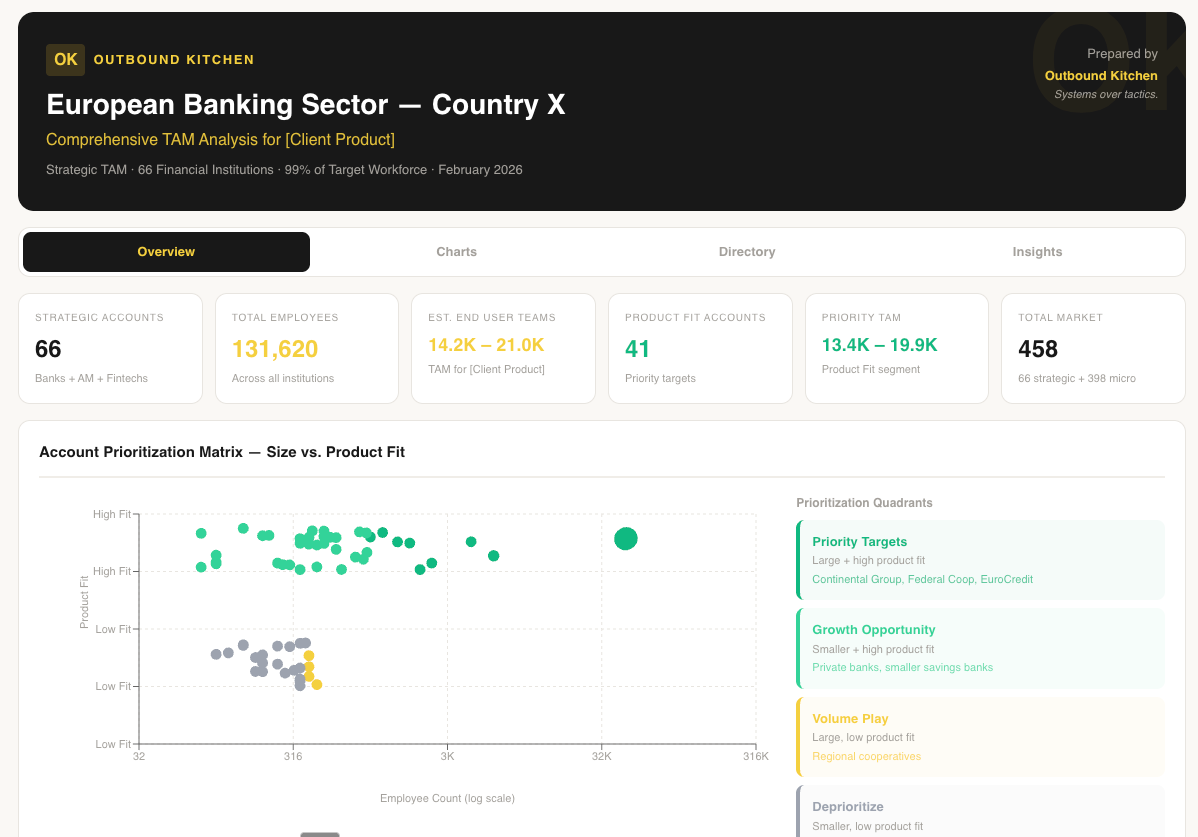
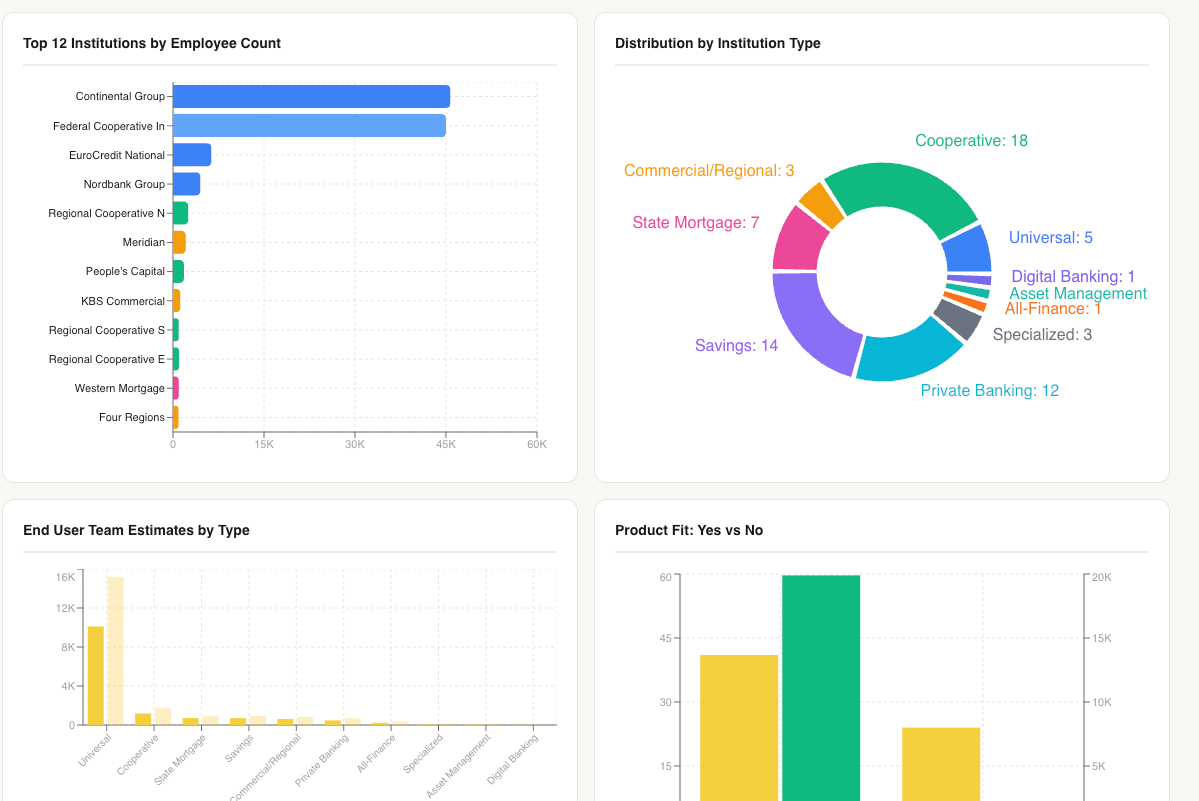
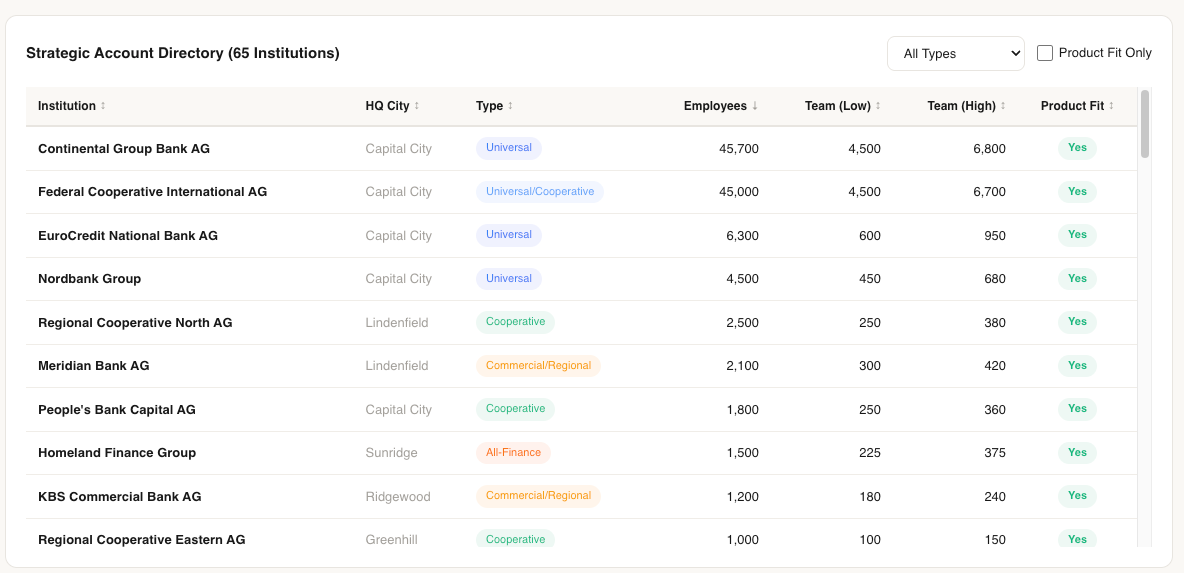
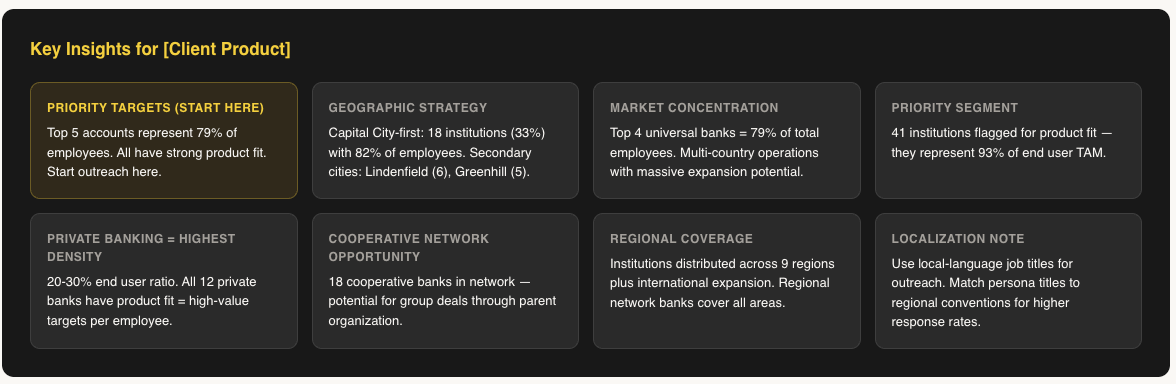
I think applying the idea of GTM as a product experience to outbound means exactly this: when someone gets on a call with you, they should get value whether they buy or not. Claude Code is what’s letting me do that without spending half my day on building this.
2. Tradeshow attendee workflow
This one’s still a work in progress, but it’s already saving hours of manual work.
Here’s what my old process looked like:
Go through the tradeshow website manually
Study the website to figure out what scraper I need (Apify, etc.)
Scrape the information
Bring it into Clay to cross-reference against the CRM
Look up contacts in another Clay table
Build a separate table to find contact info for people who aren’t in the CRM yet
Package the output and send it to my customer
That was multiple Clay tables, multiple tools, and a lot of manual decision-making at each step.
Now, depending on what the tradeshow gives you access to, there are a few ways I handle this with Claude Code:
Scenario 1: Tradeshow website (sponsors, speakers, exhibitors)
The most common one. I give Claude Code the tradeshow URL. It scrapes exhibitors, sponsors and speakers, figures out for each whether it’s a person or a company, checks if they fit my client’s ICP, looks them up in the CRM, finds the right contacts, and pulls contact info for anyone missing.
Scenario 2: Web app with full attendee list
Some tradeshows give you access to the attendee list through a web app. Sometimes Claude Code can scrape it directly via Apify or other tools. Other times I download the HTML and feed it to Claude Code so it can analyze the full list. Either way, it handles the enrichment from there.
Scenario 3: Mobile app only (what’s next)
Some tradeshows lock the attendee list behind a mobile app with no web version. Jordan Crawford recently showed a clever workaround for this: screen share from your phone to your computer, then use Claude Code to take screenshots and extract the information. I’m not doing this yet, but that’s my next step when a client needs it.
In all three scenarios, Claude Code handles what used to be steps 1 through 6 of my old process. The output is a CSV ready for Clay, which then pushes to the CRM. I send my client a Google Sheet with everyone prioritized — who to talk to first, who’s already a customer, who’s net new.
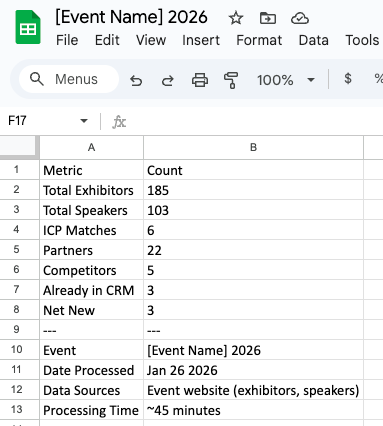

What used to take hours now takes under two. And I’m not done, the next version will include photos of each person and a talk track on why they’re worth talking to, so the team knows who to find on the floor. I’ve seen Jordan Crawford do something similar, and I want to take it further by pulling CRM context into that view.
3. Account-Based Campaign Builder
This is the one I’m most excited about, and the one I’m still actively building.
Right now, when I build a campaign for a client in Clay, it takes a long time. I’m creating multiple tables, clicking through enrichment steps, mapping contacts to accounts manually, writing messages one pattern at a time. The setup work before a single email goes out is significant.
Here’s what I’m building with Claude Code instead:
I start with two CSVs. One is the list of companies I want to prospect. The other is the contacts at those companies. I feed both to Claude Code, and from there, it connects the dots.
It maps which contacts belong to which companies. It looks at each account and finds the angles, who at that company could be a name-drop, who’s a recent hire, what’s happening at the company that creates an opening. It does the account research for each company on the list: what they do, what pain signals they’re showing, what’s relevant to my client’s value prop.
Then it pulls from my library of POV, talk tracks, cold emails and LinkedIn messages, templates I’ve built and refined across clients, and matches the right message to each situation and each contact. A recent hire gets a different message than a VP who’s been there three years. A company that just raised funding gets a different angle than one that just laid off their SDR team.
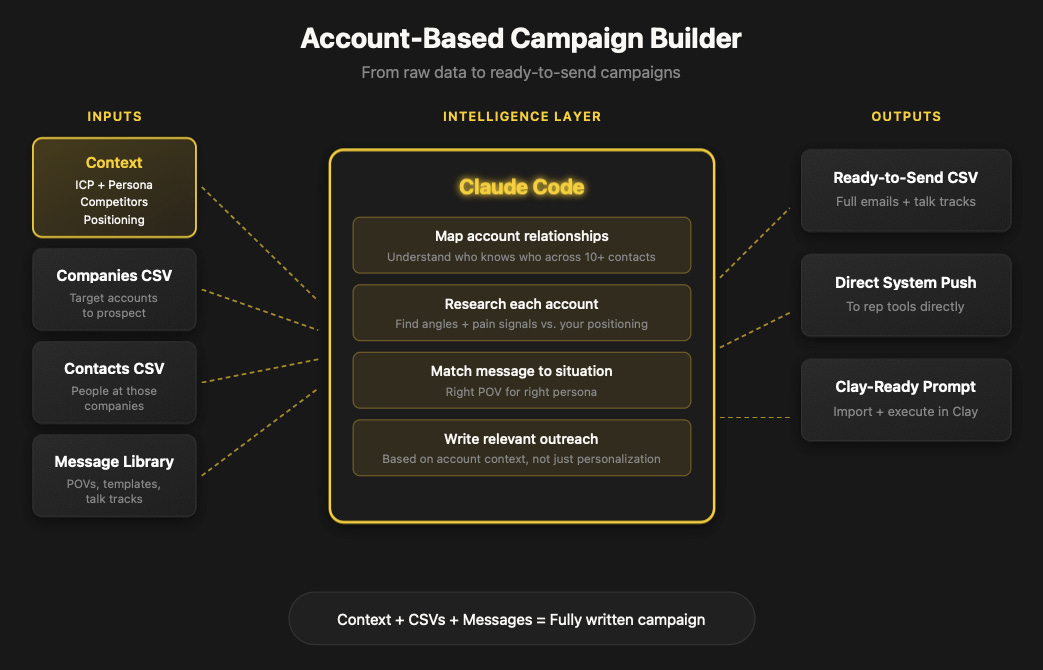
The output can go a few different directions depending on what I need:
A CSV ready to go with the full emails or messages written out, plus a POV talk track for the reps so they know why each person is getting that message
Or even pushing this directly to the systems where the rep are spending their time
A prompt built specifically for Clay, so I can import it directly and Clay handles the enrichment and sequencing from there
Instead of building multiple Clay tables and configuring each one, I’m doing the thinking and the mapping in Claude Code first, and Clay becomes the execution layer.
I’m still building this out. The workflow isn’t fully systematized yet, right now I’m doing pieces of it across different sessions. But I can see where it’s going. When it’s done, I should be able to take a campaign idea, feed it two CSVs, and get back a fully researched, fully written campaign ready to load into Clay or hand to a rep.
I think this could be a game changer, not just for my own business, but for anyone running account-based outbound. The end goal is building this into a system that anyone can plug into. That’s what I’m working toward.
What Else I’m Running Through Claude Code Weekly
ICP/TAM analysis: for clients and for my own prospect research
Account list building
Merging and cleaning CSVs before Clay
Web scraping (or building Apify scrapers for harder sites)
For one client: a custom CRM lookup app because their CRM’s API was too limited for what I needed
Building a knowledge layer from customer conversations, I’m storing all my conversations with customers and prospects (call notes, pain points, objections, what they reacted to) and layering additional research on top (company data, market context, competitive landscape). Every conversation feeds it. Right now I’m using Clarify as my CRM and working on connecting it to Claude Code via MCP so this flows in automatically. The more context Claude Code has, the better everything else gets, call prep, account research, campaign setup. And when you store enough conversations across enough prospects, you start spotting patterns that sharpen your outbound messaging and targeting.
Why I use Claude Code over other AI tools?
It’s faster than Clay for certain tasks.
I love Clay. But for some things, merging CSVs, quick data analysis, prepping account lists, doing lookups, Claude Code is just faster. In Clay, you need to connect your accounts, create a table, set up your columns, configure your enrichments. That setup time adds up. In Claude Code, I describe what I need and it runs. For the stuff that needs to go into Clay, I prep it in Claude Code first so the Clay table is cleaner and simpler.
It connects to your stack.
Claude Code can connect directly to APIs and MCPs, Lemlist, EXA, Apify, client CRMs, so it can pull data, run lookups, and build lists on its own. That said, I only use it for reading right now. I don’t let Claude Code write to CRMs. I don’t trust it to not break something yet. Clay handles the write layer, which gives me a checkpoint before anything hits a client’s system.
It compounds.
Most AI tools are one-shot. You ask, you get an answer, you start over. With Claude Code, the workflows I build for one client, call prep, tradeshow scraping, ICP analysis, I reuse and improve for the next one. The frameworks I’ve trained it on (SPICED, Gap Selling) carry forward. Each client engagement makes the system better for the next client, even though I’m not sharing any data between them. The skills and the knowledge compound over time.
I’m just getting started.
I’ve been doing this since December. Most of what I showed you is V1 or V2. I can already see where this is going, and it’s way bigger than what I’m doing today.
I’m not saying any of this is perfect. The tradeshow workflow is still V2. The campaign builder is still coming together. But that’s the point, I’m building in public, and this is where I am.
The shift from “prepping to qualify” to “prepping to educate and show value” has changed how prospects show up to my calls. And Claude Code is what’s making it possible.
Elric
Thinking about upgrading to the paid newsletter? Here’s what you’ll get:
Instant access to 40+ paid newsletters, including:
My Outbound Chef Kit: 130+ resources: 20+ email templates, cold call scripts, AI prompts, top outbound tools, and more, everything the best outbound teams use. Worth $1,000+
And the best part? You can try it free for 7 days. Cancel anytime.
But I think you’ll love it!
👉 Start your free trial today.
As soon as you’re ready, here’s how I can help:
Outbound Consulting Call: Need quick help? Book a 40-min session here.
Outbound Private Chef:
Part-time, I’ll build, optimize efficiency, and execute your outbound strategy.
Coaching/Advising: get tailored advice to fix your strategy, boost efficiency, and drive results.
Interested? Reply to this email or hit me up at bonjour@elriclegloire.com
The read/write split is the part I'd push on.
Right now Claude Code is your thinking layer and Clay is your execution layer because you don't trust Claude Code to write to client systems yet. But that boundary is going to move — probably faster than people expect. The interesting question is what your stack looks like the day you do trust it to write. Does Clay stay because it's the right execution layer, or because it was the execution layer when you built the workflow?
insightful and gave me great ideas!