


Brought to you by: lemlist
Run your outbound from ChatGPT or Claude
Find leads, enrich contacts and launch campaigns with lemlist’s MCP. Then check performance and update sequences. A GTM engineer: “the whole outbound loop runs end to end against an account.”
See how lemlist's MCP works
Before your next trade show, I’d ask yourself one question:
How many conversations have you started before the event even begins?
Because you can spend thousands on a booth, send your best reps, and still walk away with very little pipeline.
I’ve helped customers prepare for around eight events this year, and I kept seeing the same three mistakes:
Before: Waiting until the event to start conversations instead of identifying and contacting relevant buyers weeks earlier.
During: Having great conversations but letting interested prospects leave without booking the next meeting.
After: Sending generic follow-ups instead of continuing the conversations that actually happened.
Then you hear that trade shows don’t work anymore.
Sounds familiar? We hear the same thing about outbound.
But one customer I helped this year booked four meetings with some of their top European accounts, representing potential six- or seven-figure deals.
These were accounts that had never responded to their previous cold outreach.
Same companies. Same prospects.
Different opportunity to start a conversation.
Outbound is about being proactive in how you build relationships with your market.
A trade show gives you another reason to start those conversations before you arrive, continue them face-to-face, and move them forward afterward.
You don’t need to wait for someone to walk past your booth.
The event is another opportunity to move those relationships forward.
Here’s how I’d approach your next event.
How to build your outbound system for trade shows
1. BEFORE: Don’t wait until the event to start conversations
1.1. Make sure the right people will be there
You can attend as many events as your time and budget allow.
But if you’re spending thousands sponsoring a conference or exhibiting at a trade show, you probably want to make sure the investment has a reasonable chance of generating pipeline.
Here’s something I’ve seen firsthand.
I used to work with a customer who attended an event with around 100 people.
The problem?
Most of the attendees were students.
Not exactly the people they were trying to sell to.
And that’s why I’d look at two things before investing heavily in an event:
ICP accounts: How many companies attending actually fit your ideal customer profile?
Relevant personas: How many people attending are the decision-makers or influencers you want to meet?
You also want to understand how many of those accounts are existing customers or already in your pipeline.
An event with 500 attendees and a high concentration of relevant buyers could be more valuable than one with 5,000 attendees but very few people you’d actually sell to.
The number of attendees doesn’t tell you how valuable an event is. The concentration of relevant ICP accounts and personas is a much better starting point.
And ultimately, you’ll judge the investment by the pipeline and revenue it helps generate.
How Reachdesk approaches this
Ben Smith, Marketing Director at Reachdesk, shared how they built an event ROI calculator using historical attendee data and account-fit scoring to help evaluate events before committing.
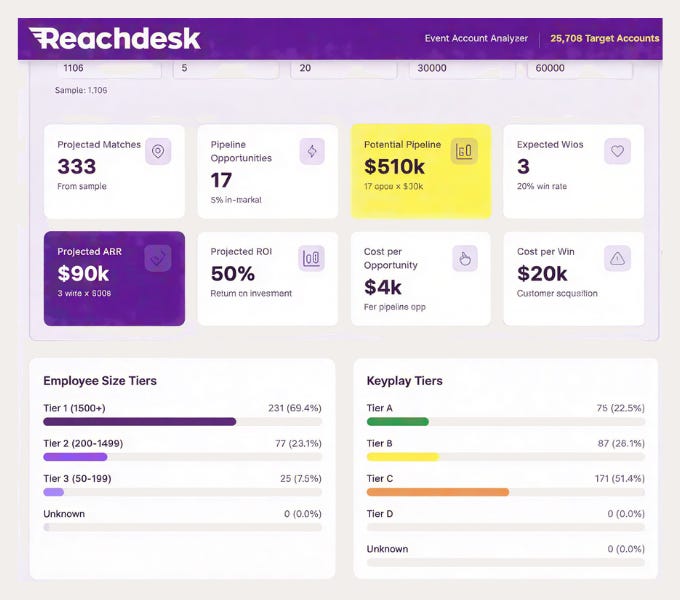
And here’s another question worth asking:
Do you actually need a booth?
If your goal is to meet 20 strategic accounts, you might get better results sending two reps and organizing a small dinner during the event.
You could spend less and still have more valuable conversations.
The goal is to invest in the events where you have the best opportunities to generate pipeline and revenue.
1.2. Find the people you want to meet before the event
Let’s say you’ve got an attendee list.
10 people? You can probably research them manually.
30? Still manageable.
But what if there are 3,000?
That’s something we dealt with recently while preparing for an event.
And here’s what I’ve seen companies do in the past:
Someone manually goes through the attendee list, checks which companies fit the ICP, searches LinkedIn for relevant contacts, finds their information, and checks the CRM.
One person at a time.
Now imagine repeating that process 3,000 times.
That’s where AI and enrichment tools can make a big difference.
Step 1: Get the event list
Depending on the event, you’ll usually run into three situations.
1. Trade show website (sponsors, speakers, exhibitors)
This is the most common one.
The event website lists exhibitors, sponsors, and speakers.
I give Codex the event URL and have it extract the available records, identify ICP-fit accounts, find relevant personas, and prepare the list for enrichment.
2. Web app with an attendee directory
Some events have a web app where you can search attendees by company, name, or job title.
When possible, I export the list directly.
Otherwise, I use Codex with tools like Apify, where I can, or analyze exported HTML to structure the information.
3. Mobile app only
Some events only make their attendee directory available through a mobile app.
No web version. No export.
I display the directory through phone screen sharing and use Codex with screenshots and OCR to extract the visible information.
Then I verify the extracted records.
The goal is the same for all three methods:
Get the available event information into a structured list you can enrich.
And don’t limit yourself to the official attendee list.
You can also find potential people to meet through:
Social media posts: LinkedIn or X posts from people saying they will attend.
The conference’s LinkedIn event page.
Attendees from previous editions.
Relevant colleagues at participating ICP accounts.
ICP accounts and buyer personas based near the event.
Just remember: being relevant to the event doesn’t mean someone is attending.
That’s why I separate confirmed attendees from potential attendees before starting outreach.
Step 2: Turn those records into people you can actually contact
Now you have your initial list.
But it might contain just company names, incomplete profiles, or people who don’t match your buyer personas.
That’s where enrichment comes in.
When you use claude code or codex, you can speed up this part of the process. if you have about ten people, you can do it by hand. for a recent event we had three thousand people, so the fastest way is to use a mix of enrichment and ai tools to do all the steps.
Here’s how I do it with Codex and enrichment tools:
Identify ICP accounts. Filter companies that don’t match your target market.
Find the right personas. Identify relevant buyers, not just anyone associated with the event.
Find and verify LinkedIn profiles. I mainly use Exa, but Clay or other providers can help.
Enrich contact information. Find and validate work emails and relevant phone numbers.
Cross-reference your CRM. Identify existing customers, open opportunities, stalled deals, and account owners.
Prioritize the list. Focus on the contacts most relevant to your sales team.
You end up with two groups:
Confirmed attendees: You have evidence they’re attending, so you can reference the event directly in your outreach.
Potential attendees: They fit your ICP and might be worth meeting, but you haven’t confirmed they’re going. Your outreach should reflect that uncertainty.
You still need to verify uncertain matches, especially when the original attendee data is incomplete.
But you’re no longer asking someone to manually research thousands of records, one by one.
Instead, your team can review the relevant results and focus on starting conversations.
Step 3: Start early and keep the list updated
Here’s another thing worth considering.
Not everyone registers for an event at the same time.
If you build your list once, a month before the conference, you might miss relevant buyers who register later.
Here’s how I’d approach the preparation:
Around 30 days before: Build the first list, identify priority accounts, and start outreach.
Each week: Refresh the available attendee data, identify new contacts, and update existing records.
The final week: Confirm meetings, finalize the priority list, and prepare talking points for your reps.
The exact timing depends on the event, but I wouldn’t wait until a few days before it begins.
The earlier you identify relevant people, the more opportunities you have to start conversations before everyone arrives.
1.3. Give those people a reason to meet you
You’ve identified your target accounts.
You’ve found the relevant people.
Now what?
Start reaching out before the event.
But here’s a mistake I’d avoid.
The typical event invitation
BAD EMAIL
Hi Sarah,
We’re exhibiting at {{event}} next month.
Would you be available for a quick demo at our booth?
Why would Sarah make time for that?
She’s probably receiving dozens of similar invitations.
You’re asking someone to give you time without offering much in return.
Give them a reason to meet
Instead of asking prospects to visit your booth, think about what would make the meeting worthwhile.
Here’s what I’ve seen work better:
Private dinners: Invite a small group of leaders from your target accounts.
Happy hours: A more informal way to start conversations.
Breakfast or coffee: Easier for people with packed conference schedules.
You don’t necessarily need a bigger budget.
Sometimes, reallocating part of your booth budget toward a dinner or another experience creates better opportunities for conversations.
Example 1: You’re hosting a dinner
BAD EMAIL
Hi Sarah,
We’re attending {{event}} and would love to show you our solution.
Do you have 30 minutes for a demo?
BETTER EMAIL
Hi Sarah, are you heading to {{event}}?
We’re organizing a small dinner with {{persona}} leaders from companies like {{company}} and {{company}} to exchange ideas around {{topic}}.
Not sure if that’s something you’d enjoy, but happy to send over the details.
See the difference?
You’re not immediately asking someone to sit through a product demonstration.
You’re giving them a reason to meet.
In my experience helping customers prepare for events, we’ve had better results with specific offers like dinners and happy hours than with generic booth-demo invitations.
Example 2: You don’t have a special offer
What if you’re not organizing a dinner?
You can still use the event as a reason to reach out.
But I wouldn’t make the event the entire reason for the message.
BAD EMAIL
Hi Sarah,
We’re going to {{event}} next month.
Are you attending? Would love to catch up at our booth.
BETTER EMAIL
Hi Sarah,
Noticed {{relevant company initiative}}.
Not sure if {{plausible operational challenge}} is something you’re looking at, but we’ve been helping teams with {{relevant outcome}}.
Are you heading to {{event}}? We’ll be there at Stand {{X}}, if a quick conversation while we’re both around would be easier.
The difference?
You’re still leading with a relevant business problem.
The event just makes the next step easier.
And remember: personalization isn’t the same as relevance.
Mentioning someone’s company or job title doesn’t automatically make your message worth reading.
Don’t use the same message for every part of your funnel
You also might have open opportunities, stalled deals, and customers worth meeting.
New prospect: Start a conversation
Open opportunity: Meet stakeholders or advance the deal
Stalled opportunity: Reconnect in person
Customer: Strengthen the relationship or explore expansion
For example, if you’re already working an opportunity, your prospect might value meeting your product leader to work through an unresolved question.
Another example: Reachdesk
Reachdesk shared how they used a $100 spa voucher giveaway as an incentive to encourage event meetings.
The event gives you a reason to reach out. Your offer gives the prospect a reason to meet.
You can run these campaigns through the event app, cold email, LinkedIn, and cold calling.
Don’t arrive at the event hoping to meet the right people. Get those conversations scheduled before you arrive.
2. DURING: Your booth isn’t your entire territory
Now let’s say you’ve done everything right.
You’ve identified the right accounts.
Started outreach.
Booked meetings.
And your team is finally at the event.
What happens next?
Most teams spend the day at their booth, waiting for people to stop by.
But why limit yourself to the people who happen to walk past?
Your booth is one place to have conversations. It shouldn’t be the only place you’re looking for them.
2.1. Find where your buyers already are
Look at the event agenda.
Which sessions cover problems your product helps solve?
Which exhibitors or sponsors are accounts you want to meet?
Where have your contacts said they’ll be?
Let’s say you’re selling software that helps sales teams improve outbound performance.
You notice a session about SDR productivity.
A couple of hundred attendees are interested enough in that topic to spend time learning about it.
That doesn’t mean they’re all potential customers.
But it gives you a good place to start.
After the session, you could ask someone:
“What was your biggest takeaway from that session?”
Imagine you’re speaking with a VP of Sales.
They mention that their team has enough SDRs, but the quality of meetings is inconsistent.
Now you have a relevant conversation to explore.
You can ask what they’ve tried, understand whether it’s a meaningful priority, and see if there’s a reason to continue.
That’s a different approach from immediately asking:
“Would you like to see a demo?”
Why this works
A relevant session gives you three things:
Audience concentration: People interested in a particular topic are gathered in one place.
Conversation context: You have a shared reference that makes starting a conversation easier.
Potential qualification information: What someone found interesting may reveal a priority or challenge worth exploring.
Don’t limit your event strategy to your booth. Find where your prospects are already having conversations about the problems you solve.
2.2. Prepare reps for conversations, not just product demonstrations
Here’s something else I think gets overlooked.
Your sales reps are at the event to have conversations and create opportunities.
Not to spend their time searching LinkedIn, navigating spreadsheets, figuring out account ownership, or entering information into the CRM.
A good system should prepare your reps to have more high-quality conversations without wasting selling time.
That’s why I’d give them one central app.
Before the event, you’ve already identified your priority accounts, enriched the contacts, and researched relevant talking points.
Now your reps can access everything in one place.
Here’s what I’d include:
1. Priority contact list
The companies and people your team wants to meet.
I’d include profile pictures where available, along with names, job titles, companies, priorities, and confirmed attendance status.
This makes it easier to recognize people you’ve researched or already arranged to meet.
2. Account intelligence
CRM status, existing relationships, account owner, relevant initiatives, and reasons for prioritizing the account.
3. Talking points
A few relevant questions or business problems to explore.
Not a script the rep needs to read word for word.
Just enough information to prepare for a useful conversation with the accounts you know are attending the event or the people standing by your booth.
4. Contact capture and enrichment
Scan a badge, LinkedIn QR code, or business card.
Then enrich missing information and match the contact with existing CRM records.
5. Conversation notes
Capture what was discussed, the prospect’s interests, and the next action through text or voice notes.
6. Meeting booking
Schedule the next conversation directly with the appropriate rep while the prospect is still interested.
7.Event map
Find the exhibitor stands or locations of your priority accounts.
Imagine your rep is about to speak with someone from a priority account.
Instead of spending five minutes searching for context, they can open the account, understand the opportunity, and focus on the conversation.
And when someone expresses interest, they can capture the notes and book the next meeting without switching between multiple tools.
The goal is to give them more time for the conversations that generate pipeline.
A small detail: Learn the event’s badge categories
Some conferences use different badge colors or labels for attendees, exhibitors, speakers, students, and other groups.
Find out what those categories mean.
That can help your team recognize different attendee types and prioritize its time.
But don’t assume a badge color tells you whether someone fits your ICP.
An exhibitor could still be a strategic buyer, for example.
Use the badge as a clue, not as a substitute for qualification.
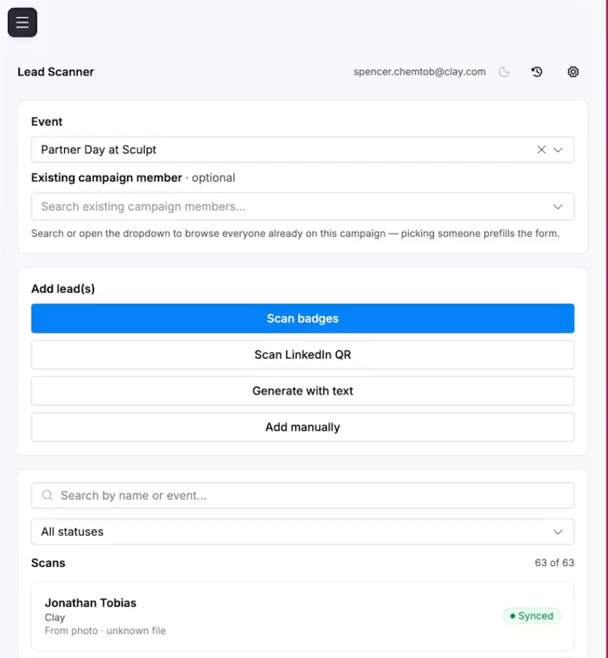
What Clay built
Clay built an application that lets its team scan a prospect’s LinkedIn QR code, enrich the contact, apply its qualification and routing rules, and generate a QR code to book a meeting with the assigned rep.
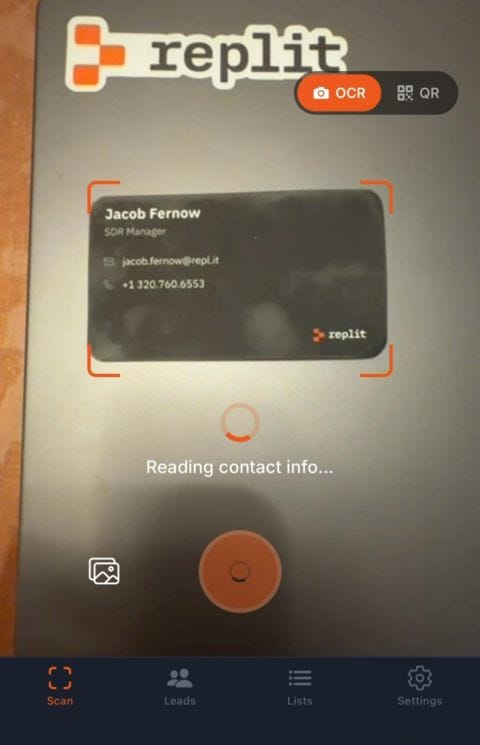
What Replit built
Jacob Fernow shared a custom app built at Replit.
Their app captures contacts, supports notes or recordings, enriches missing information using tools such as Apollo and Exa, and routes contacts into HubSpot.
Both are good examples.
But I’d go one step further by including the pre-event priority list and account intelligence in the same application.
That way your reps can use it to prepare for conversations, not just capture new leads.
2.2. Don’t let interested prospects leave without booking the next meeting
You have a great conversation at an event.
The prospect is interested in a demo.
Your rep scans their badge, takes a few notes, and tells them someone will follow up next week.
That’s where you lose momentum.
Now your SDR has to reach out. The prospect has to respond. And you have to find a time that works for everyone.
The conversation was warm. But you’ve introduced unnecessary friction.
I recently saw this with a customer. Their team was scanning badges and capturing notes, but important contact details, such as phone numbers and LinkedIn profiles, were missing.
So we had to find that information before the reps could even follow up through those channels.
And for prospects who had already agreed to a demo, there was a simpler solution.
Book the meeting before they leave.
When I worked at Chili Piper, we did that. We could book 50 to 100+ meetings for each event.
We used an iPad or laptop with a booking page to schedule follow-up meetings directly at the event.
No waiting until next week. No unnecessary back-and-forth.
And you don’t need a complicated app to do this.
Here’s what I’d make sure your event system handles:
Capture the conversation: Collect the right contact details, context, and what the prospect wants to discuss.
Book with the right person: Show the appropriate AE’s real calendar availability, with buffers between meetings.
Sync everything to your CRM: Make sure the meeting, notes, and ownership are recorded so nothing gets lost.
If you’ve already built an event app, you can integrate these steps directly into it.
And to measure whether your system works, track the conversion from interested prospects → meetings booked → meetings held → qualified opportunities.
Because scanning a badge tells you who you met.
Booking the next meeting is how you start turning that conversation into pipeline.
3. After the event
Now your event is over.
Your reps are back at work.
And hundreds of contacts need follow-up.
What happens next?
Usually, something like this.
Example 1: You had an interesting conversation but didn't book the meeting
BAD EMAIL
Hi Sarah,
Thanks for stopping by our booth at {{event}}!
It was great meeting you.
Would you be interested in scheduling a demo?
You’ve probably received a version of this email yourself.
And it has one big problem.
You could send it to almost anyone who visited the booth.
You’ve already had a conversation. Why are you writing as if you’re starting from zero?
Let’s say Sarah told your rep that her company was struggling with onboarding employees across several warehouse locations.
Your rep captured that information in the event app.
Here’s how you could follow up:
BETTER EMAIL
Subject: Onboarding across your warehouses
Hi Sarah,
Enjoyed chatting at {{event}} about how you’re managing onboarding across your different warehouses.
You mentioned that keeping the process consistent as you open new locations has been challenging.
Thought this resource on {{specific topic}} might be useful: {{resource}}.
Happy to pick up the conversation if helpful.
See the difference?
The first email could have been sent to anyone.
The second shows you actually listened.
And because your rep captured the conversation, you have the context needed to continue it.
Example 2: It was an existing opportunity
Let’s say your AE met a prospect who’s already evaluating your product.
Subject: The reporting question we discussed
“Hi Sarah,
Good catching up at {{event}}.
You mentioned {{specific issue}} is still the main question your team wants to resolve before moving forward.
I’ve shared our conversation with {{AE name}}, and we’re pulling together the information we discussed.
We’ll send that over as agreed.
You’re following through on a commitment.
Not starting another sales pitch.
Example 3: You’ve already booked the next meeting
If the prospect agreed to a meeting at the event, you don’t need another email asking whether they’re interested.
You need to confirm what was agreed and make sure the right people are prepared.
Subject: Our discussion on warehouse onboarding
Hi Sarah,
Enjoyed meeting you at {{event}}.
Looking forward to our conversation on Tuesday about how you’re managing onboarding across your warehouse locations.
I’ve copied James, who’ll be joining us, and shared the context from our conversation.
We’ll focus on the areas you raised.
That’s much more useful than another generic event follow-up.
Here’s how I’d make the handover work
Once a prospect books a meeting:
Send a personalized confirmation. Reference the specific topic or problem they wanted to discuss. The calendar invitation should have a clear agenda.
Include the appropriate BDR or AE. Create a shared thread so the receiving rep isn’t starting from zero.
Share something relevant when useful. A case study or resource should address what the prospect actually asked about, not just promote your product.
Connect on LinkedIn where appropriate. If you had a meaningful conversation, a relevant connection request can help maintain the relationship.
Brief the receiving AE. Share the account context, questions raised, promised next steps, and meeting objective.
If the BDR joins the beginning of the meeting to introduce the AE, even better.
They can confirm what the prospect originally wanted to discuss and make sure the handover is accurate.
Because the last thing you want is for someone to attend a demo and realize the AE has no idea what they discussed at the booth.
Another idea I liked from Jordan Crawford and Tennr
Jordan shared an interesting follow-up idea that Tennr planned to use after their event.
Send a handwritten thank-you letter.
Here’s how they planned to do it:
Have an artist handwrite a short note thanking the prospect for visiting their booth.
Add a small illustration related to their industry.
Sign it from the team.
Mail it in a hand-stamped envelope to their verified business address.
I like this approach because not every post-event interaction needs to be another sales pitch.
Sometimes, the goal is simply to be remembered when the next conversation happens.
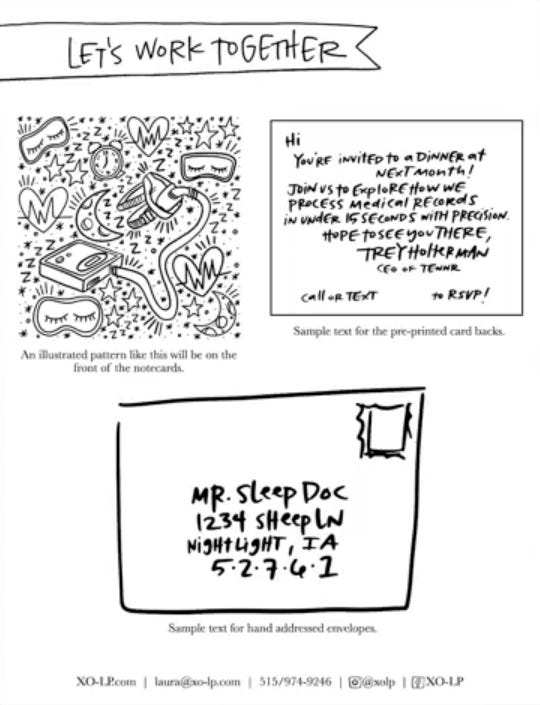
The picture shows what they use before the event. They worked with the same artist to make the follow-up handwritten letters.
4. Before you call the event a success, look at the numbers
I found this interesting discussion on Reddit’s r/sales.
A salesperson described attending a trade show in London.
Their team collected 1,100 badge scans.
Sounds impressive, right?
But after going through the spreadsheet, they identified only eight contacts worth following up with.
1,100 scans. Eight worthwhile prospects.
That’s 0.7%.
It’s one salesperson’s experience, not an industry benchmark, but it illustrates an important problem.
You can collect hundreds of contacts and still have very few worth pursuing.
And that’s why I’d stop treating badge scans as the main measure of event success.
4.1. Set goals before the event
Before arriving, I’d set realistic expectations for the sales team.
How many relevant conversations and meetings could you reasonably expect each rep to generate?
Maybe five meetings per rep.
Maybe ten.
It depends on the event, how many relevant buyers you can identify, the number of days available, and what you’ve achieved at previous events.
If you have historical data, use it.
If you don’t, start with a reasonable target and learn from the results.
But I’d distinguish between:
Meetings booked before the event.
New meetings booked onsite.
Meetings that actually happened.
Qualified opportunities created or progressed.
4.2. Don’t forget the full cost of the event
You’re probably already tracking sponsorship, booth, travel, and accommodation expenses.
But there’s another cost worth considering.
Your team’s time.
If you send four reps to an event for three days, that’s twelve rep-days away from their normal selling activities.
That time is part of the investment.
And it’s another reason to prepare the list, meetings, and account intelligence before the event begins.
You want your team spending those days having conversations with your ICP accounts.
4.3. Measure the commercial outcomes
Here’s what I’d look at.
Before and during the event:
Relevant ICP accounts and personas identified.
Meetings booked before arriving.
Qualified conversations during the event.
Follow-up meetings booked onsite.
After the event:
Meetings actually held.
New qualified opportunities created.
Existing opportunities advanced.
Pipeline generated and influenced.
Revenue eventually closed from event-related opportunities.
Total event investment, including your team’s time.
I’d also distinguish new pipeline from existing pipeline the event helped move forward.
Not every deal closes immediately, so keep tracking what happens afterward.
And I’d ask one more question.
What did your team learn about the market?
Which problems kept coming up?
Which invitations got people interested?
What objections did prospects raise?
Which conversations led to real opportunities?
That information can help you improve your targeting, messaging, offers, and preparation for future events.
A good event should help you build a better outbound system for the next one.
You don’t need a bigger booth to generate more pipeline from your next trade show.
You might not even need a booth.
You need to identify the right ICP account and personas before the event.
Give them a reason to meet you.
Make it easy for your team to turn interested conversations into scheduled next steps.
And continue those conversations afterward instead of sending another generic follow-up.
Because the value of your event isn’t the number of badges scanned. It’s the pipeline and revenue you generate from the right conversations.
Don’t wait for opportunities to walk past your booth.
Create them.
If you’re preparing for an event and struggling to figure out how to build this system, reply to this email.
Elric
P.S. This is the kind of outbound system I’m building the Outbound Kitchen Membership to help you implement.