


Brought to you by:

Run your whole outbound workflow from 1 prompt
Connect ChatGPT or Claude to more than 40 lemlist actions: source, enrich, write, launch. A gtm engineer who set it up said, “the whole outbound loop runs end to end against an account.”

300 SDRs. 30,000 email sequences. A 0.5% reply rate.
That was Snowflake’s SDR process before they rebuilt it.
They had the team, the budget, and the scale.
But all that scale produced a reply rate of half a percent.
Then they changed the system.
Today the same team runs prospecting at a 7.6% reply rate (a 15x lift). Their outbound system has now processed 55,000 prospects and booked 2,000+ meetings.
Every time I break down Snowflake, I hear the same objection:
Snowflake has 300 SDRs and unlimited resources. This is not applicable to me and my 3 reps.
Fair objection. But here is what it misses:
Snowflake already had 300 SDRs and a big budget when they were getting 0.5% reply rates. That is why a 3-person team can run the same logic, at a smaller scale.
So the fix was the system.
And a system does not care whether you have 1 rep, 3 reps, or 300.
A 3-person team can run the same logic at a smaller scale.
Today, we are going to reverse-engineer Snowflake’s AI outbound system and pull out what is actually transferable to your team.
Move 1: Build the system in the backend, not as a new tool
Snowflake did not buy a new app or hand reps a new tool to learn. The system runs in the backend of the tools the reps already use.
Here is what that looks like. A rep is on LinkedIn, finds 20 prospects, and drops them into an Outreach sequence. That is the whole job. The workflow fires in the background, and 2 to 3 minutes later, when they open Outreach, all 20 emails are already drafted, each with an account brief and a call script next to it.
Building it there buys back time. Before this, an SDR writing one good email was jumping across 6 tabs: Outreach, Salesforce, Tableau, SQL, ZoomInfo, LinkedIn. Every one of those clicks is a minute not spent with a buyer.
Put the system in the backend and the clicks disappear, so the rep’s hours go to revenue-generating activity (for an SDR, prospecting like cold calls) instead of tab-switching.
The principle: when you improve your outbound stack, ask one question first. New tool = frontend or backend for your rep?
A frontend means training, adoption, and another tab for your reps.
A backend means the improvement shows up inside the workflow they already live in.
Move 2: Orchestration with one prompt per job
Most reps give AI one prompt: write me a cold email for this company. That is why the output is generic. One prompt cannot do the work a good rep does before they write a word.
Writing a relevant email is a process, not one step. A good SDR researches the account (first-party and third-party data), finds something relevant, picks the angle for the persona, writes, then checks it.
Snowflake broke that process down, gave each step its own prompt, and chained them.
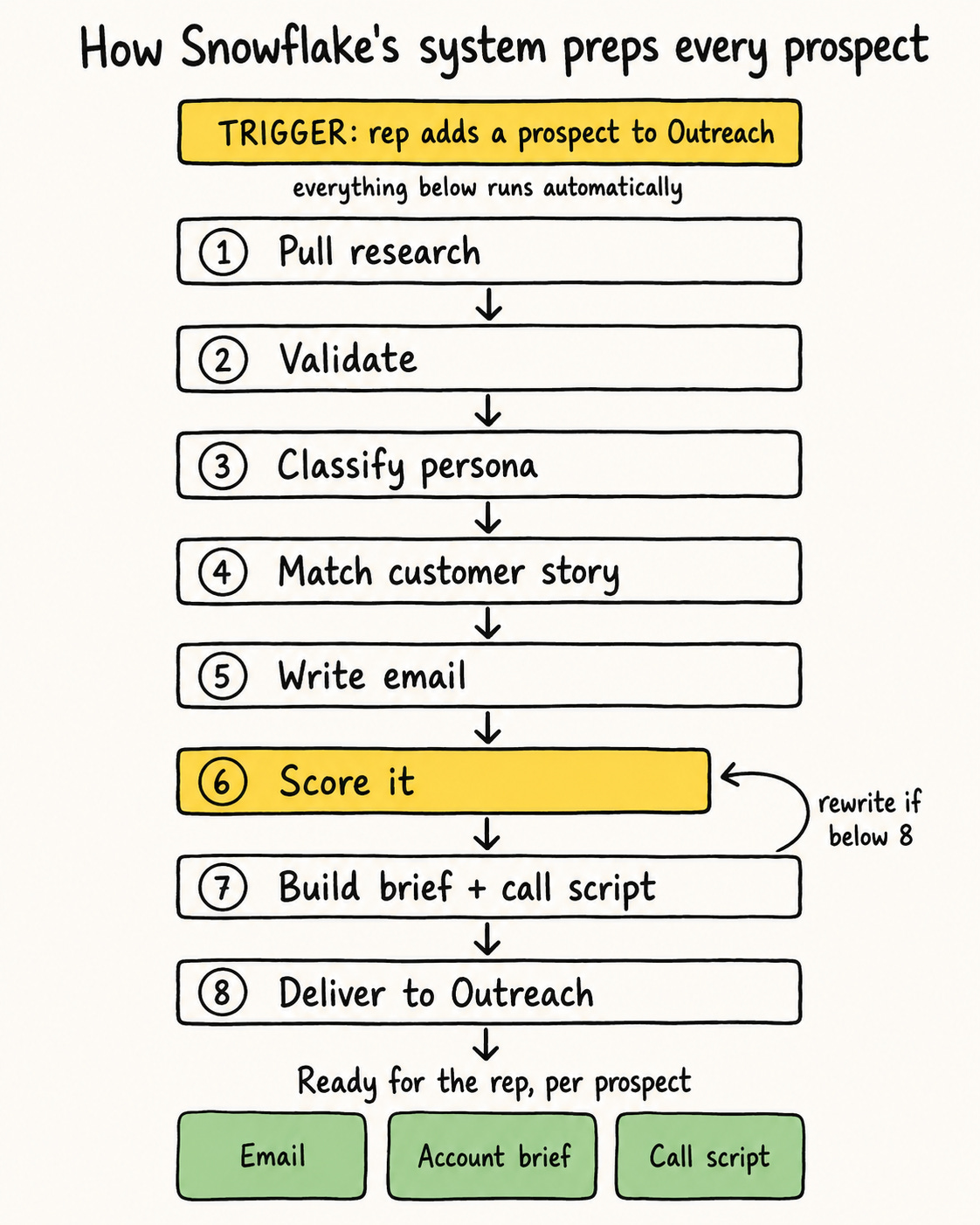
Here is the actual workflow, the SDR process broken into steps. Everything after the rep drops a prospect into Outreach runs on its own:
Pull the research. First-party data from Salesforce and the data warehouse, third-party data from ZoomInfo, and a live web search for recent, relevant news.
Validate it. A prompt checks the research is about the right company and drops anything off-target, so the email is not built on the wrong facts.
Classify the persona. A prompt tags the prospect’s seniority, from IC to C-suite. This decides the angle, the length, and the depth of the email.
Match a customer story. Search your case studies for the one or two most relevant to this prospect.
Write the email. One prompt drafts it from the validated research, for that persona.
Score it. Another prompt grades the draft against a rubric and sends it back to be rewritten if it falls short. That guardrail is the next move.
Deliver it. The output is wrapped in XML tags so the system parses each piece cleanly and loads it into Outreach.
Build the extras. The same research becomes an account brief and a call script for the rep.
Snowflake uses Workato, but you can use orchestration tools like Clay, Cargo, Zapier, or n8n. Even one rep can chain three steps by hand: run a research prompt, feed its output into a writing prompt, then into a review prompt.
The tooling to automate the chain is what scale buys you. The thinking behind it, one prompt per job, works at any size and costs nothing. That is the step most people skip.
Move 3: They built a scoring gate before anything sends
This is the answer to the thing everyone worries about: you cannot just trust AI to write and hit send. Snowflake learned that the hard way.
Their early misfires:
“We saw your SEC investigation.”
“Congrats on the CEO transition,” sent to a company whose CEO had just been fired.
“Hope the layoffs are going smoothly.”
So they built The Refinery. The AI scores its own draft against a 10-point rubric. Only a draft that scores 8 or higher goes out. Anything below that gets rewritten and scored again, and the system cannot skip the step.
The transferable version is simple: add a scoring or review step before every send. It can be a second prompt grading the first, or it can be you or your reps reading the draft against three questions before it goes out. Either way, nothing ships unreviewed.
I got the same issue with AI building these systems for my own customers: confident, well-written, and wrong about the one fact that mattered, or even hallucinating. In the early stage of this system, you need someone to control the quality.
Move 4: What they tell the AI to write
These are the performance numbers Snowflake built into the prompts.
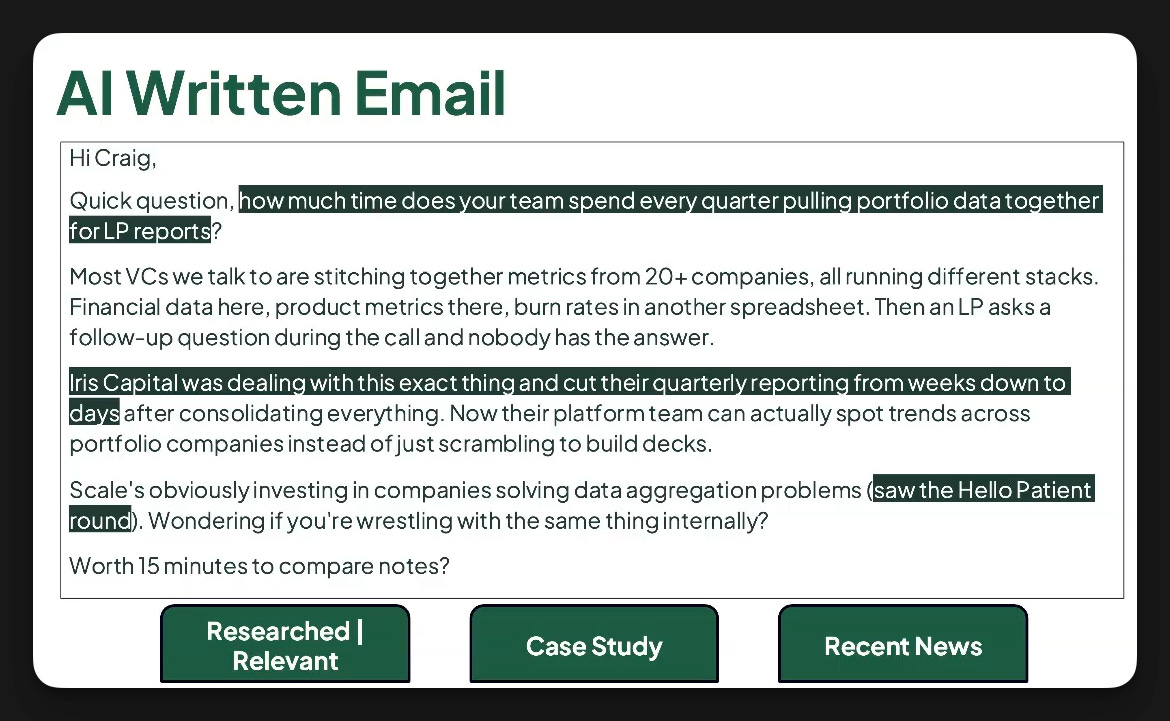
Lead with the prospect’s business problem, not Snowflake features. Business-first emails get 40% higher engagement than feature-first.
Keep it short. Emails under 100 words reply at 5.4%, against 2.1% for longer ones.
Ask a question. It lifts reply rates by 50%.
Frame it as loss, not gain. Loss-aversion converts 2 to 1 over benefit framing.
Ask for 15 minutes, not 30. The shorter ask gets 68% higher acceptance.
So where do you start?
Not at full automation. Snowflake did not either.
Build it with the reps, never for them.
Stand up a small pilot team (like a tiger team): a handful of reps who run the new workflow next to their normal one and flag what is off. Snowflake started with 10 SDRs on a 50/50 A/B test, half the prospects on the AI sequence, half on the normal one, so the reps saw the two side by side. That feedback loop is how a team comes to trust the output instead of working around it. Build it on top of what they already do, not as a thing done to them.
Who owns this system?
If you are early, one rep or a fractional GTM engineer owns it, builds it, tunes it. If you are bigger, centralize it. Snowflake made exactly that shift, from decentralized to centralized: instead of every rep running their own research and picking their own sequence, one team owns the whole workflow. Jeff Long in Ops owns the AI for all 300 SDRs. One owner means one place to fix a prompt, and the fix reaches the whole team at once instead of living in one rep’s private setup.
This is not a quick win
Snowflake broke their version 147 times before it held. Mine took 50+ passes with one customer. This is not a prompt you paste once and walk away from. It works, and it takes real reps to get there.
Here is why I am confident this system transfers to a small team.
The teams I have helped build their own version of this booked 20-100 meetings each from it. All in under three months.
One closed $1.5M+ in revenue via AI-written email
Another closed $30K+ in revenue in less than 5 weeks via AI-written email
Another influenced $6M+ in revenue in 12 months via a modern outbound system like Snowflake's.
None of them had 300 reps.
Hope this was helpful
See you in the next newsletter!
Elric
P.S.: If you need help setting this system for your team, I can help. Reply to this email.
That is also what I am building inside the new Outbound Kitchen membership:the system, playbooks, the AI workflows, and the templates to install these systems yourself.
The system logic here is real solid, but Move 4’s prompt rules assume a buyer who behaves like a SaaS buyer or a tech-savvy new-generation kind of buyer I think - a fast reader, replies to cold email, says yes to 15 minutes without much friction. Let’s say if you were to outbound industrial buyers like Vp Ops etc, I notice they don’t move like that, also loss framing works differently when the loss is abstract (like falling behind competitors) versus concrete (a compliance deadline). The scoring gate in Move 3 is the actually transferable idea. 💯 just email rules in Move 4 need a bit of rewrite for anyone selling into manufacturing, energy, construction etc (unless the persona is a digital/It/transformation)
Thank you for sharing this, was super interesting
What a great one! Love the email example inside. More of this, please. Have a great week!