


👋 Hey chef, Elric here! Welcome to this week’s free edition of Outbound Kitchen. Each week I dive into reader questions about creating outbound systems for sustainable growth. Thinking about going paid? Here’s what you’ll unlock right away:
Instant access to 40+ paid newsletters, including:
My Outbound Chef Kit: 130+ resources (20+ email templates, cold call scripts, AI prompts, top tools, and more). Value: $1,000+
And the best part? You can try it free for 7 days. Cancel anytime.
But I think you’ll love it!
👉 Start your free trial today.
The live sessions are back, first one in 12 months.
The podcast format has changed. No more talking-head conversations. We build live, show screens, walk through real examples.
First session: 5 AI Role-Play Use Cases for Outbound Teams and Cold Calling. Part 2 with Troy Johnson.
Built for GTM leaders developing cold calling skills at scale.
You’ve seen this pattern before. Ramp, Owner.com, and now ClickUp.
Outbound teams producing outsized results.
Not just through headcount. Through systems.
This week, Kyle Coleman posted this. Same team size. 3x the pipeline.
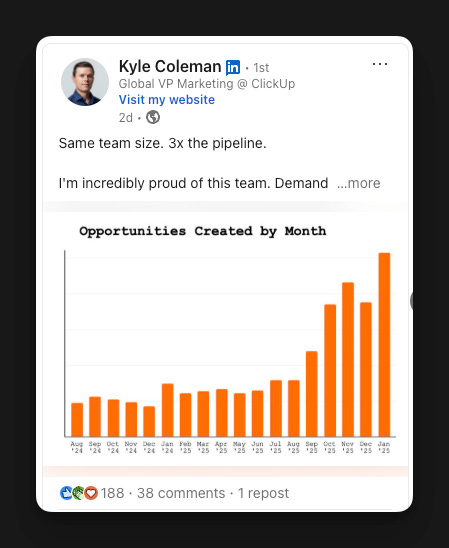
In the post, he called out four systems driving the results:
XDR activity went from ~35 to ~150 calls per day through infrastructure changes
Automated signal monitoring that pushes intel into rep workflows programmatically
Every tool and process audited for friction, with XDRs co-authoring every change
AI embedded at every layer, context stitching, workflow automation, feedback loops
I already broke down ClickUp’s outbound strategy in a previous issue:
How ClickUp Scaled to $300M With 2 Outbound Teams
Since then, ClickUp’s Growth Ops team shared one of their recipes.
Today we focus on one specific system, the AI-powered call prep that turns a parallel dialer into a context machine. It’s the specific workflow under #4 that directly enables #1. When you use a parallel dialer like Nooks and go from 35 to 150 calls a day, you need a way to maintain quality at that volume. The AI-powered call prep is what makes that possible, it turns every dial into a context-loaded conversation.
Andy Cabasso (Growth Ops Manager) broke down the system architecture, what failed, and the one thing that made it stick.
P.S. key Results from Clickup:
11x LTV lift when customers move from self-serve to sales-assisted
3x CAC reduction (50% from culture/team alignment, 50% from incrementality testing)
$1M pipeline/month from their inbound AI-SDR in the first month of piloting (via Retool)
$300M+ ARR announced September 2025
Same team size. 3x pipeline.
Top SDRs booking 200+ meetings in a quarter.
The Recipe
ClickUp uses Nooks, a parallel dialer that lets reps dial six prospects simultaneously. When someone picks up, you have zero seconds to prepare. Before this system, reps had Salesforce, LinkedIn, Pocus, Outreach, and multiple dashboards open. Scrambling for context mid-conversation.
The Growth Ops team built a system that killed the scramble.
Here’s the exact architecture.
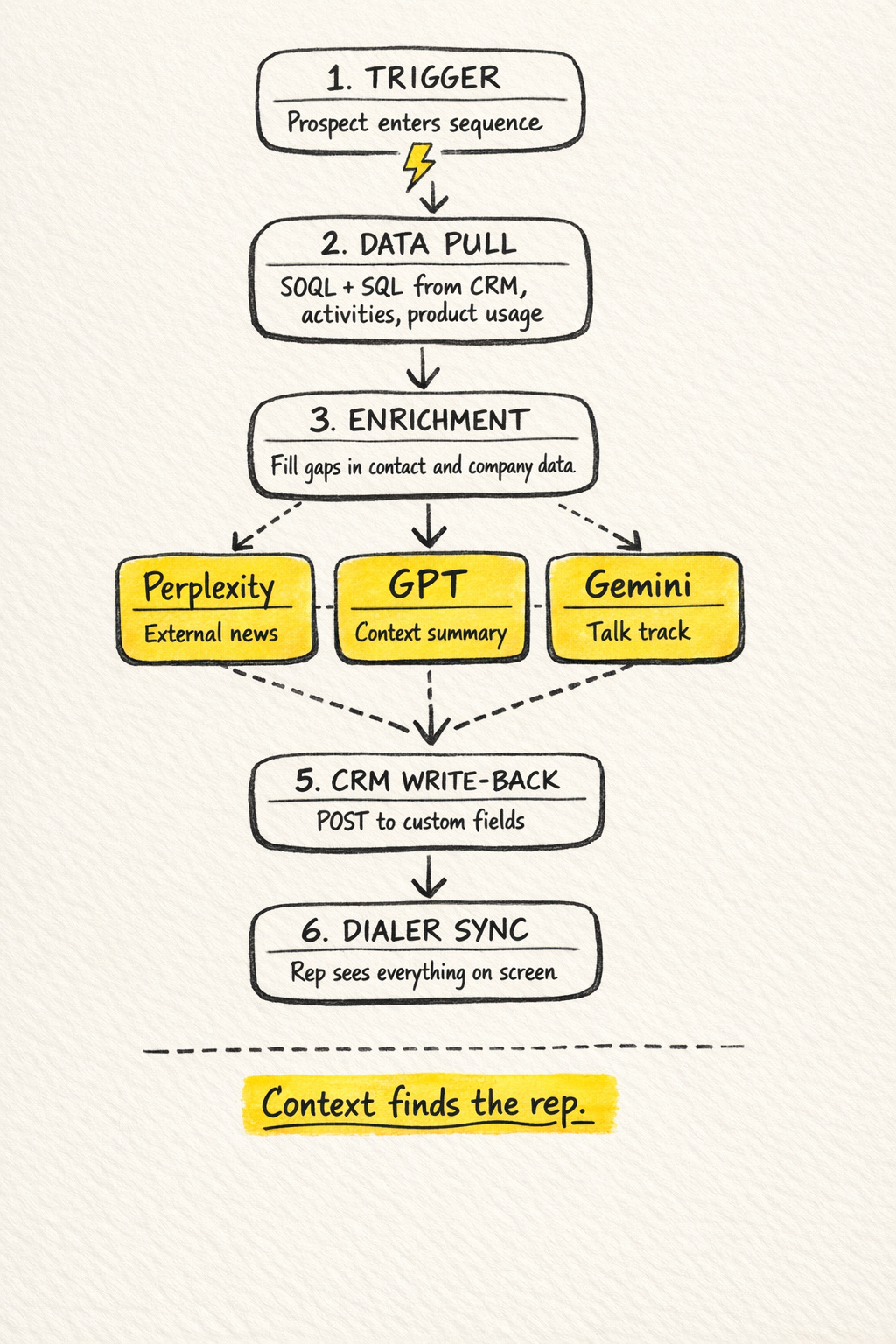
The system runs as an automated workflow in Retool. You could build something similar in Workato, n8n, Make, or Zapier.
Step 1: The trigger. Every time a prospect enters a sequence in their sales engagement platform, that platform sends a webhook to Retool with the prospect details. That webhook starts the workflow.
Step 2: Data pull. A set of SOQL and SQL queries pulls data from their data warehouse tables. They bring in CRM data about the contact and account, recent logged sales activities, details on the current email sequence the prospect is in, and product usage highlights: free vs. paid, signup date, key events.
Step 3: Enrichment. If there are gaps on the contact or company, an enrichment flow runs to update and fill in missing fields.
Step 4: Three parallel AI queries. Full context loaded. Three AI models fire at the same time:
Query 1 (Perplexity): Looks up the company online and finds recent news relevant to ClickUp’s offer. Summarizes the context and how it ties into their pitch.
Query 2 (OpenAI GPT) Summarizes the company context, the prospect’s activity history, and their product usage.
Query 3 (Gemini): Uses everything they know about the prospect plus internal data to develop a full talk track for the rep.
Step 5: CRM write-back. A POST webhook writes these outputs into custom fields on the prospect record in their CRM. Those fields sync to their dialer.
The result: Prospect picks up. Rep already has background, activity summary, and a talk track on screen.
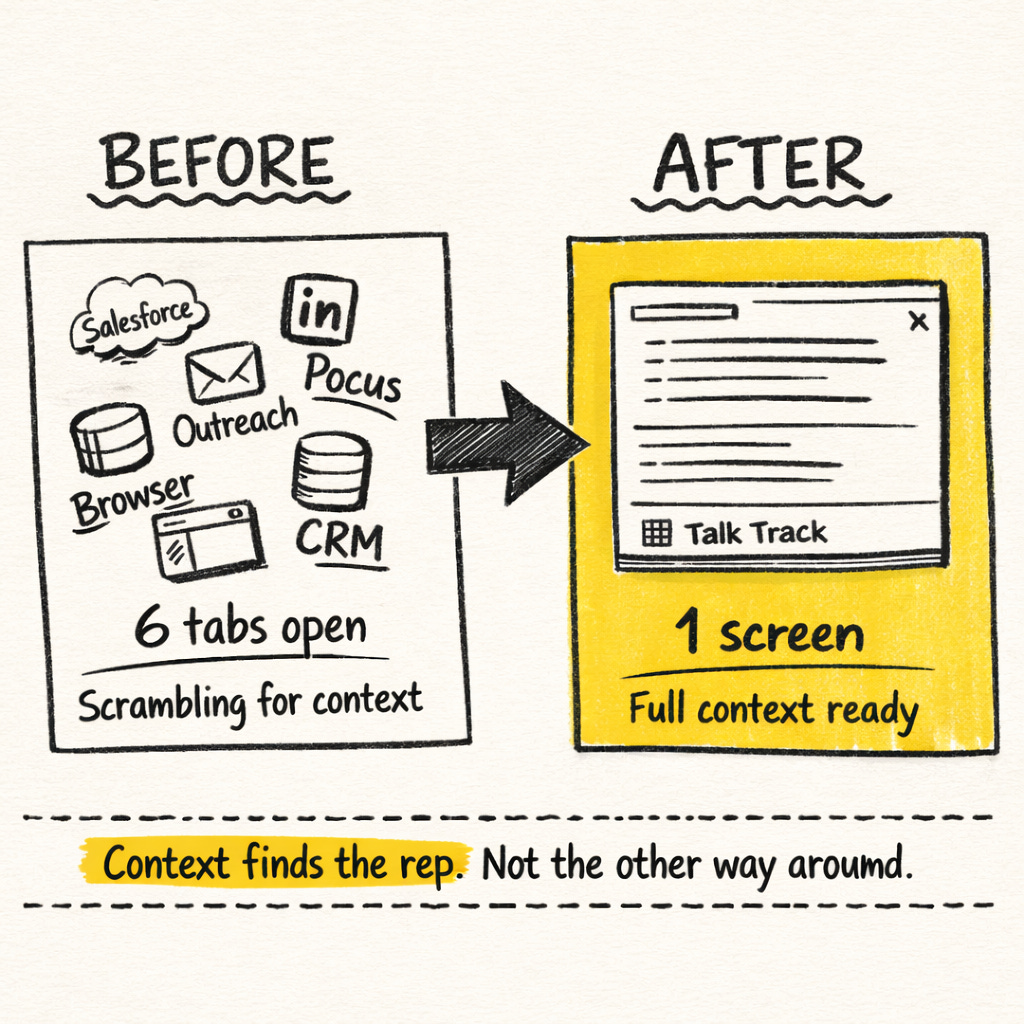
The rep sounds like they’ve been studying the account for 20 minutes. “Hi, I noticed your team has been using ClickUp for project management but hasn’t activated the automations, curious if that’s intentional.” That’s the difference between a hang-up and a conversation.
No training deck does that. Live context does.
That’s the recipe. Not more dials. Better conversations on every dial.
What Broke
The workflow worked on day one. The AI outputs were unusable.
Three things kept breaking:
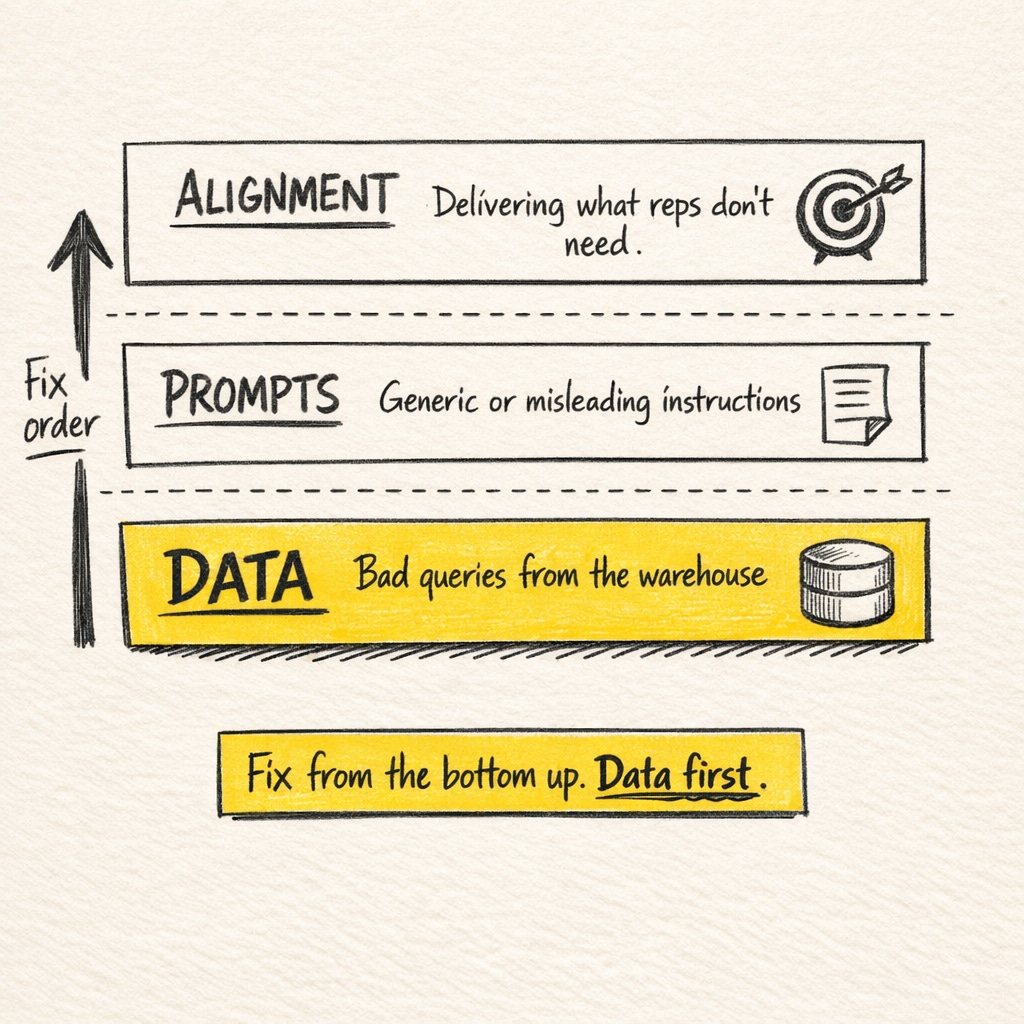
1. Bad data queries from the warehouse.Wrong fields, stale records, incomplete data, everything downstream breaks. Andy Cabasso’s advice: "if the AI output is wrong, check your SOQL and SQL first. The data is usually the problem”.
2. Poor prompt engineering. Even with clean data, poorly constructed prompts produce generic or misleading outputs. If an AI output looks off, start by improving the prompt, tightening the instructions, and giving clearer examples.
3. Misalignment between what reps needed and what the system delivered. This one is the least obvious. The system might be technically sound, clean data, good prompts, but if it delivers information the rep doesn’t actually need in the moment, it’s noise.
Here’s what that looks like in practice:
“A prompt might tell a rep the prospect is on a free plan when they’re actually a paid customer. That’s a credibility-killer. And in a cold call, there’s no recovery from getting basic facts wrong.”
One wrong output and the rep never opens it again.
They tested everything. Different models for different jobs:
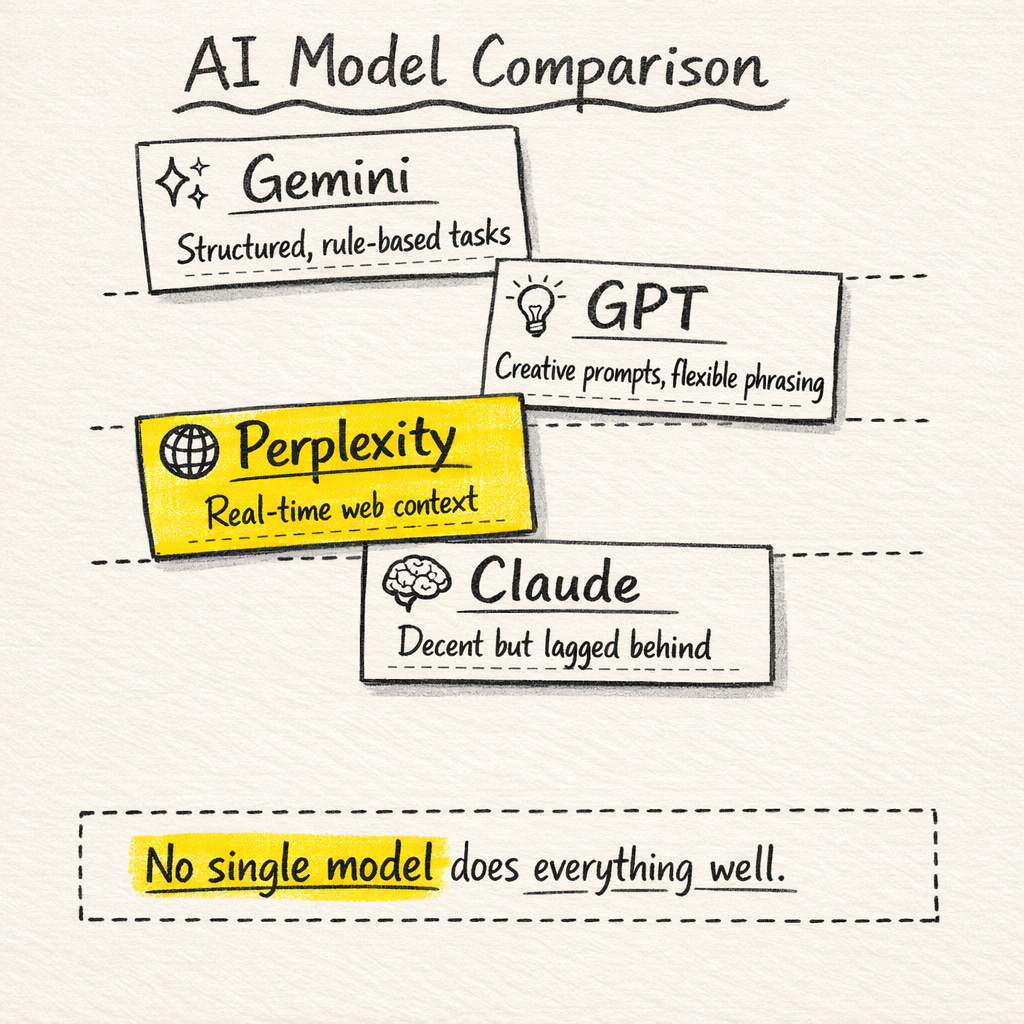
Gemini performed best for structured, rule-based tasks
GPT handled creative prompts and flexible phrasing
Claude had decent real-time performance, but still lagged
Perplexity was essential for up-to-date web context
No single model does everything well. If you’re running one model for every task, you’re getting mediocre output on most of them.
What Actually Made It Work
Their SDRs told ops when the outputs were wrong. Every time.
The talk track was off → they said so.
The data was stale → they flagged it.
Format wasn’t useful → they pushed back.
Without that loop, the system would’ve looked good in a demo and died in production.
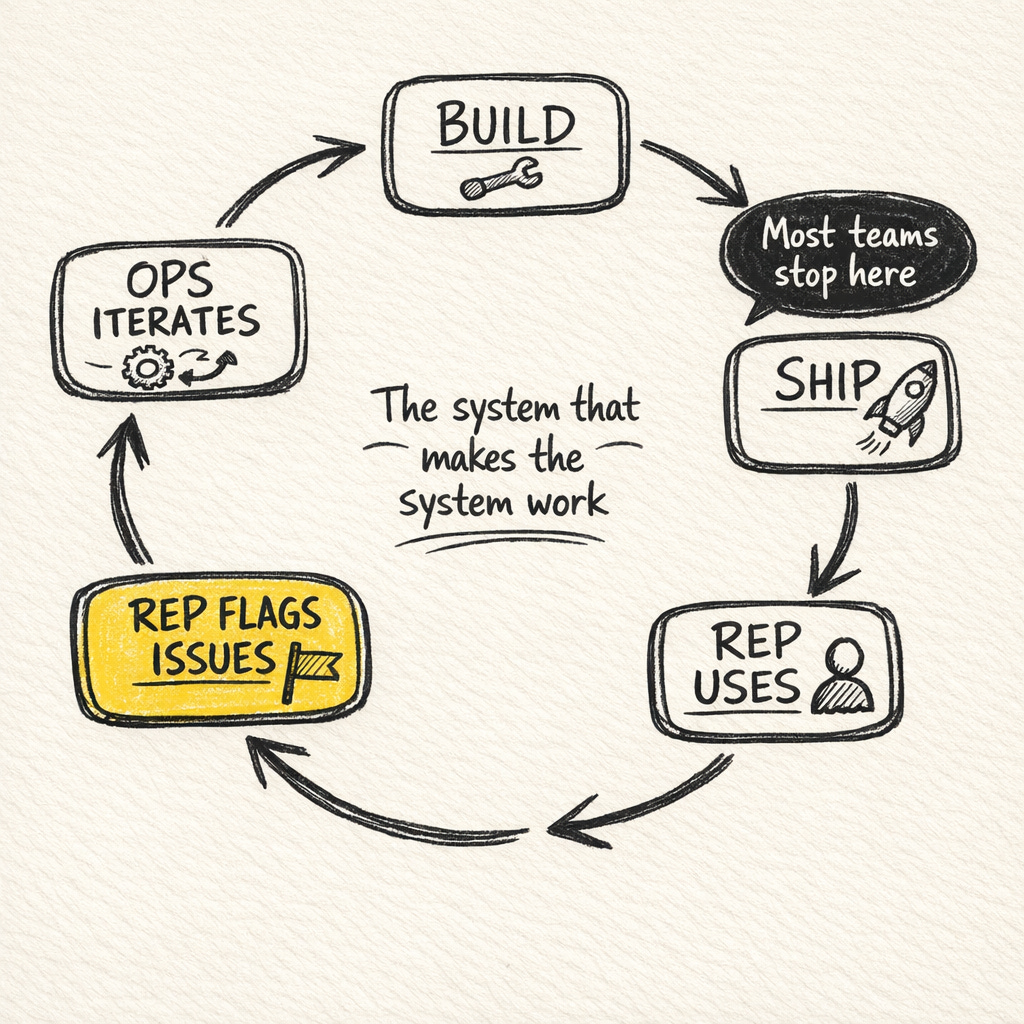
Most companies never get here. They invest in the architecture, the workflows, the integrations, the AI models. They ship something that looks impressive in a demo. And then reps quietly go back to their old way within a week.
The feedback loop itself is simple, a Slack channel or a weekly review. The hard part is reps who actually say “this output is wrong” and ops teams who actually fix it.
ClickUp got this right because they started with the culture before they scaled the technology. One of their SDRs flagged the original problem and then helped shape every iteration of the solution.
Talk tracks got more accurate. Reps stopped checking Salesforce manually. Call conversion improved. Each iteration compounded because the people using the tool were the same people shaping it.
The Takeaway
This is one system. ClickUp’s 3x didn’t come from the AI call prep alone. The first breakdown covers the rest of their outbound strategy. Read my first deep dive here.
Three questions to audit your own AI implementation:
Is the data correct? Audit your SOQL/SQL queries before blaming the model.
Are the prompts specific enough? Vague instructions produce generic results. Tighten the input, tighten the output.
Do the people using it have a voice in improving it? If reps can’t flag bad output and see it get fixed, they’ll stop using it.
ClickUp took reps from ~35 calls a day to ~150, with a top performer booking 200 meetings in a quarter. We’re still finding the ceiling on what a rep can do when the systems keep getting better.
Follow Kyle Coleman (Global VP Marketing, ClickUp) and Andy Cabasso (Growth Ops Manager) for the source material.
Until next time, build systems, not shortcuts.
Elric
What’s coming in February:
Benchmark for U.S. mobile phone numbers (the first of several)
2025 outbound benchmark and recap
How I use Clay
Thinking about upgrading to the paid newsletter? Here’s what you’ll get:
Instant access to 40+ paid newsletters, including:
My Outbound Chef Kit: 130+ resources: 20+ email templates, cold call scripts, AI prompts, top outbound tools, and more, everything the best outbound teams use. Worth $1,000+
And the best part? You can try it free for 7 days. Cancel anytime.
But I think you’ll love it!
👉 Start your free trial today.
As soon as you’re ready, here’s how I can help:
Outbound Consulting Call: Need quick help? Book a 40-min session here.
Outbound Private Chef:
Part-time, I’ll build, optimize efficiency, and execute your outbound strategy.
Coaching/Advising: get tailored advice to fix your strategy, boost efficiency, and drive results.
Interested? Reply to this email or hit me up at bonjour@elriclegloire.com